This guide is written for private dental practices in the United States and Canada. Adapt terminology, privacy procedures, advertising claims and patient communication to the federal, state, provincial and professional rules that apply to your practice.
Quick answer
To choose dental social media templates for a private practice, check five things: whether the topics match your services, whether the files fit your social platforms, what your team can edit, whether planning tools are included, and how the license applies. The best choice is the system your staff can customize, review, and publish without rebuilding every post from scratch.
What Should Social Media Templates for Dentists Include?
A template purchase should remove recurring production work, not simply provide attractive graphics. Before comparing page counts, look at the topics, file formats, editing controls, planning resources, and license. Those details determine whether the files will fit an actual clinic workflow.
1. Topics that match the practice
A feed made entirely of offers quickly becomes repetitive. Look for a mix of patient education, service awareness, trust, appointment reminders, seasonal messages, and clinic updates. A family practice may need preventive care, children’s dentistry, recall reminders, and new-patient orientation. A cosmetic practice may prioritize whitening, veneers, clear aligners, implants, and consultation prompts.
The available topics should support what the clinic wants to communicate this month. If your team still needs a topic plan, start with these 30 dental social media content ideas for private practices.
2. Dental Social Media Post Sizes for Instagram, Facebook, and Pinterest
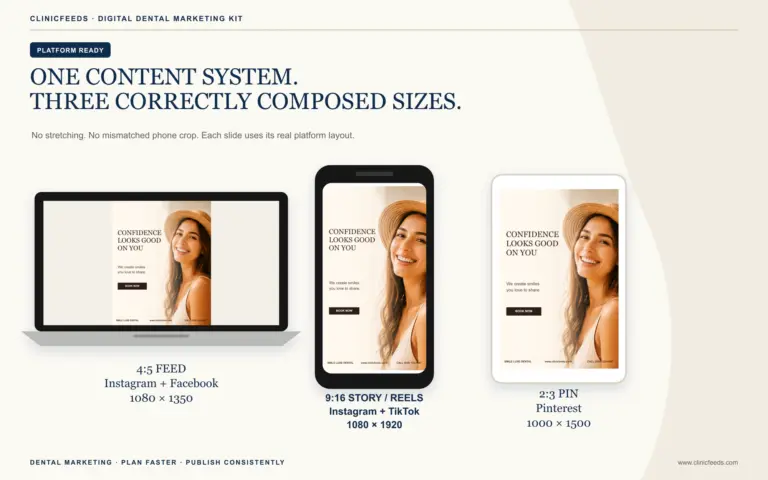
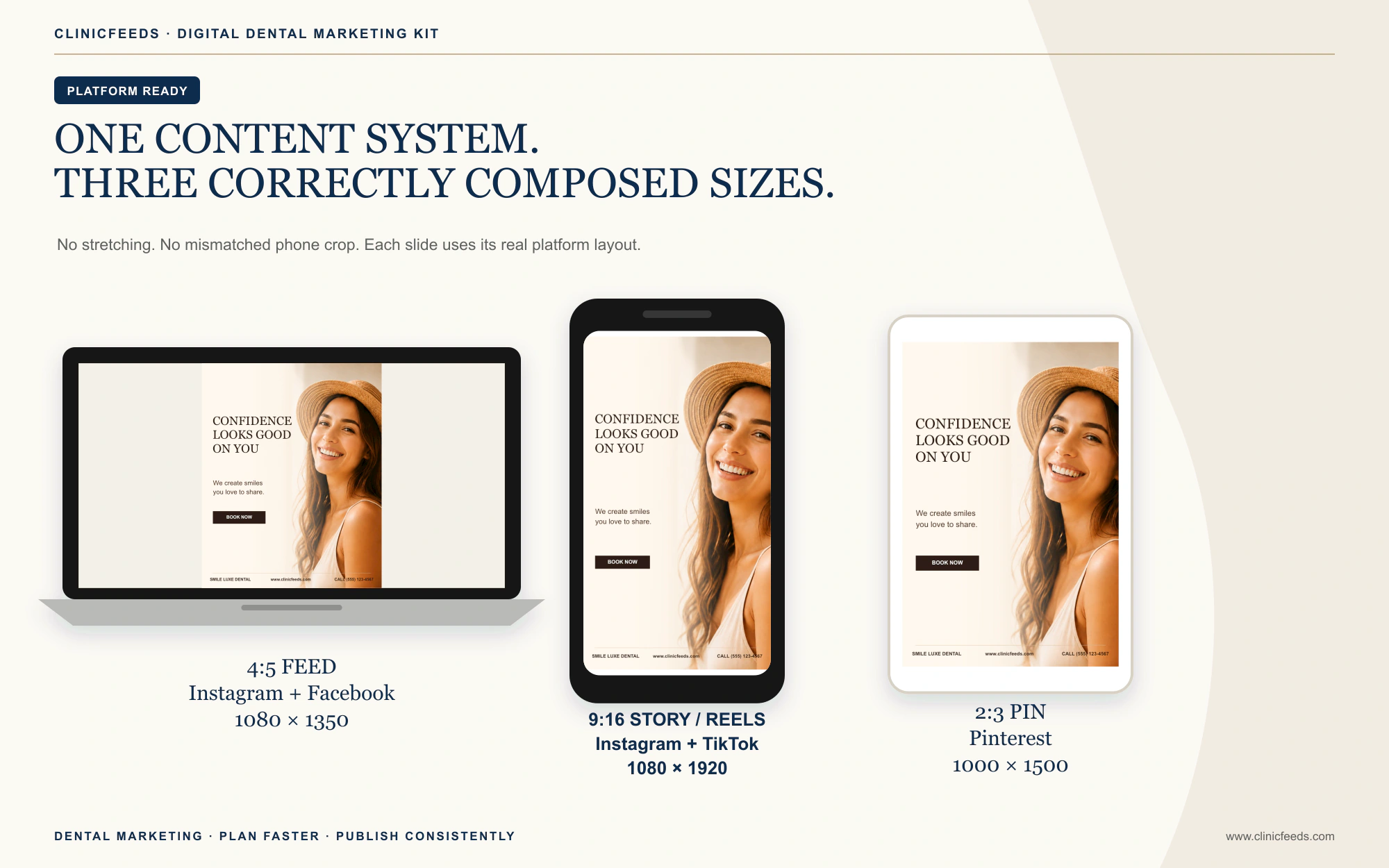
One square layout should not be stretched across every channel. Instagram and Facebook feeds, vertical Stories or Reels, and Pinterest Pins use different proportions. Text size, image crop, and CTA placement need to be composed for each format.
| Format | Platform placement | Review before publishing |
|---|---|---|
| 4:5, 1080 x 1350 px | Instagram and Facebook feeds | Check headline size, image crop, and CTA spacing on a phone. |
| 9:16, 1080 x 1920 px | Instagram and Facebook Stories or Reels | Keep essential text clear of interface overlays near the top and bottom. |
| 2:3, 1000 x 1500 px | Pinterest Pins | Make the topic understandable before the user clicks through. |
Platform requirements can change. Confirm current specifications before launching a major campaign, even when the source files are already prepared at common dimensions.
3. Editable text, images, and brand details
Editable dental social media templates should let the clinic replace the headline, supporting copy, CTA, practice name, website, phone number, colors, and sample image. If those elements are locked, the finished post may still look generic or contain details that do not apply to the practice.
Choose a visual direction that is reasonably close to the clinic’s brand. Changing a few colors and images is efficient; rebuilding typography, hierarchy, and every image crop defeats the purpose of buying templates.
4. Planning tools beyond the graphics
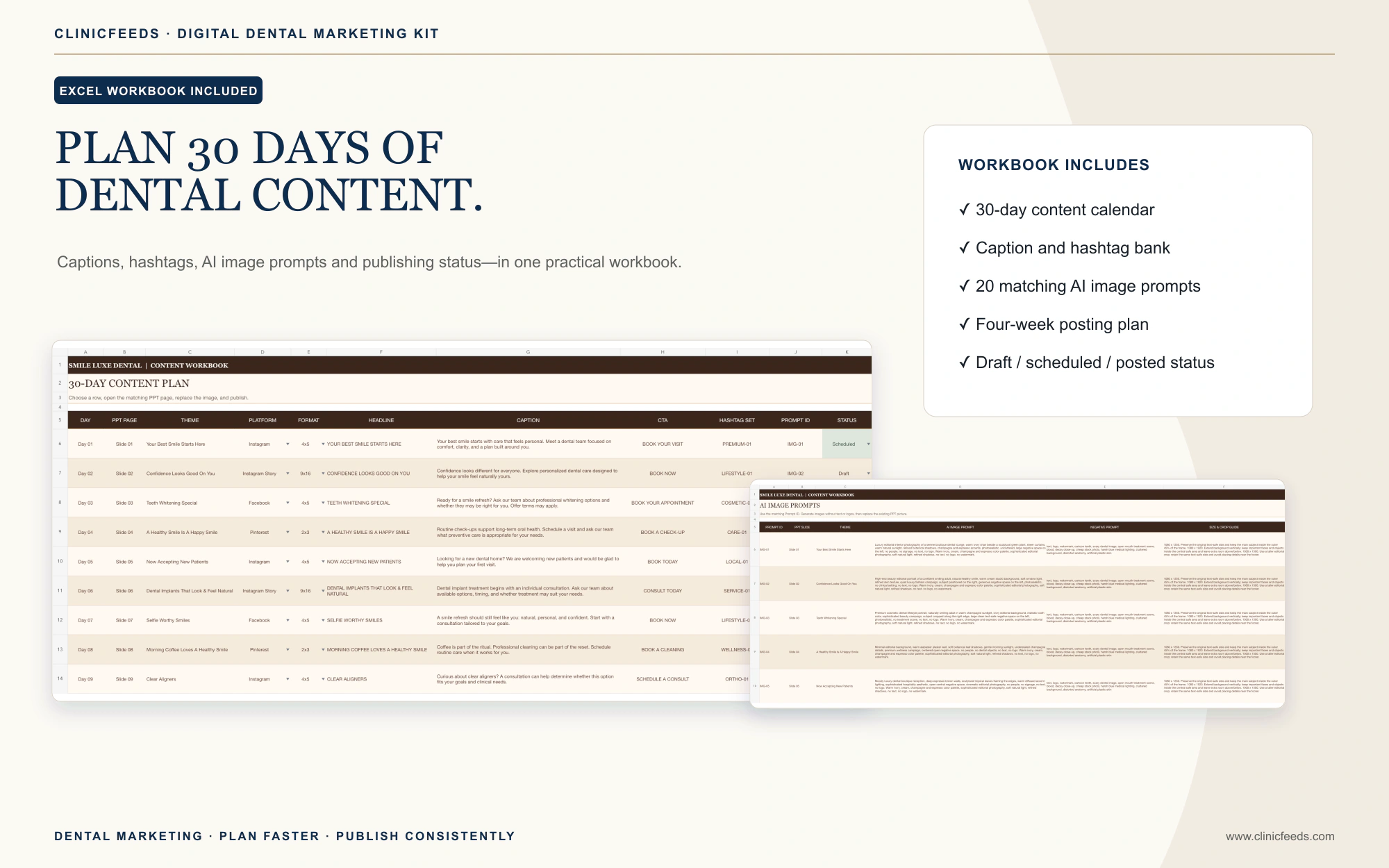
Graphics answer how a post will look. They do not decide when it should run, which service the practice should prioritize, or how many promotional posts belong in one month. A dental social media content kit can reduce that planning work by including a calendar, draft captions, hashtag groups, photography prompts, or a weekly publishing structure.
These extras matter most for a practice manager handling social media alongside other responsibilities. For a complete planning method, see how to build a 30-day dental social media content calendar.
5. Licensing that matches the buyer
Confirm whether the purchase covers one practice, multiple locations, or agency clients. A single-practice license may allow finished posts, advertisements, email graphics, website graphics, and in-office materials for the licensed clinic while prohibiting redistribution of the editable source files.
Agencies should check whether each client needs a separate license. Written terms are more reliable than assumptions made after the files have been delivered to a client team.
Free vs Paid Dental Social Media Templates
Search results include free template libraries, monthly content memberships, one-time downloadable kits, and full agency services. Each option removes a different amount of work.
| Option | Best suited to | Main tradeoff |
|---|---|---|
| Free template library | A team testing basic post formats with time to search and customize | Designs, topics, captions, sizes, and licensing may be spread across different sources. |
| Monthly template membership | A clinic that wants new content added on a continuing schedule | The practice pays recurring fees and may need to use the provider’s editing platform. |
| One-time downloadable kit | A practice that wants reusable source files and a defined content system | The included topic library is fixed unless the clinic creates or purchases more content. |
| Dental marketing agency | A clinic that wants strategy, production, approval support, and campaign management | Costs are higher and the agency still needs accurate input and approvals from the practice. |
Free dental social media templates can be enough for an occasional post. They become less efficient when the team must find matching designs, rebuild sizes, write every caption, and create a calendar separately. A one-time dental social media template kit is a better fit when the practice wants a coordinated starting point but does not need new templates delivered every month.
Can Dentists Create Social Media Posts Without Canva?
Yes. A clinic can edit dental social media templates in PowerPoint when the files have already been built at the correct dimensions. Team members who know how to edit slides can replace text and images, update clinic colors, and export the finished page as PNG or JPG.
This approach works well for practices that already use Microsoft Office and do not want another design subscription. It also gives the clinic local copies of the editable source files, which can be organized by month, service, or campaign.
PowerPoint does not schedule posts, measure performance, or edit social video. It handles the static design stage. The finished images still need to be reviewed and published through the clinic’s normal social media workflow.
PowerPoint vs Canva for Dental Social Media Templates
PowerPoint and Canva can both produce polished dental social media graphics. The practical difference is not which platform is universally “better”; it is which editing workflow your clinic can repeat without losing files, missing approvals, or rebuilding sizes every month.
| Workflow question | PowerPoint templates | Canva templates |
|---|---|---|
| Where editing happens | In a local PPTX file using Microsoft PowerPoint. | Primarily in a Canva account through a browser or app. |
| File ownership and handoff | The clinic keeps editable source files and can archive a dated copy for each campaign. | The design normally stays in the account or team workspace and can be shared through Canva permissions. |
| Team collaboration | Works well when one person edits and a reviewer checks exported drafts or shared Office files. | Useful when several approved team members need browser-based comments or collaborative editing. |
| Platform sizes | Separate PPTX files can be supplied at fixed 4:5, 9:16, and 2:3 dimensions. | Designs can be created at different dimensions; access to specific resize features depends on the current Canva plan and workflow. |
| Included media | Depends on the seller. ClinicFeeds sample photography is replaceable, and the clinic remains responsible for image rights and patient permission. | Canva offers its own content library under Canva’s current content licenses and plan rules. |
| Best fit | Clinics already using Microsoft Office that want reusable local source files and no Canva requirement. | Clinics that prefer a browser-based design workspace and account-level collaboration. |
When PowerPoint is the simpler clinic workflow
PowerPoint is a practical choice when the practice manager already works in Microsoft 365, wants a local copy of every editable campaign, or needs a predictable handoff between the person editing a post and the person approving it. A clinic can keep an untouched master file, duplicate a monthly working copy, update the text and image layers, and export the approved slide as PNG or JPG. Microsoft documents that a presentation can use a custom slide size, while every slide inside that presentation uses the same size; this is why ClinicFeeds supplies separate files for the supported ratios.
The software still does not write strategy, schedule posts, or approve patient-facing claims. The value comes from using familiar tools and correctly composed source files. Follow the ClinicFeeds guide to customize dental social media templates in PowerPoint and use the dental social media post size guide before exporting.
When Canva may be the better fit
Canva may suit a clinic that wants browser-based collaboration, centralized brand controls, or access to Canva’s design and media ecosystem. Before committing to that route, confirm who owns the account, which team members need access, what happens when a staff member leaves, which plan features the workflow depends on, and how the clinic will archive approved designs.
Canva publishes separate terms for the platform and its content library. Review the Canva licensing overview and Content License Agreement for the assets your team intends to use. The same underlying rule applies to any editing platform: verify the rights to stock images, logos, testimonials, and patient photography before publishing.
What ClinicFeeds supplies
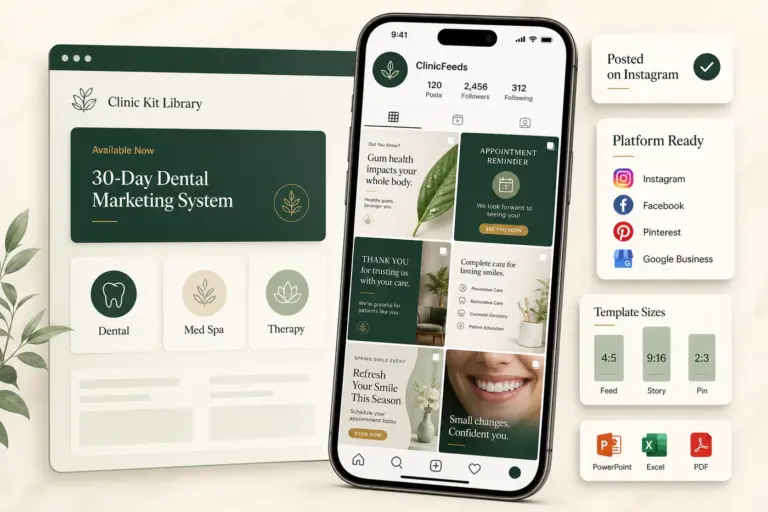
ClinicFeeds products use the PowerPoint route. The dental kits provide editable PPTX files rather than Canva links, with separate layouts for the supported platform sizes and an Excel planning workbook where listed on the product page. A Canva subscription is not required, and the templates are not represented as Canva templates.
This is most useful for a small dental team that wants to download the source files, keep a clean master, customize a working copy, and send exported graphics through its existing review and publishing process. Compare the exact files and license for each available product in the dental social media template catalog.
Five questions to decide between the two
- Who will edit the posts? Choose the software that person can use confidently without a new production bottleneck.
- Who approves them? Define how drafts, corrections, and final files will move between the editor and the clinical or compliance reviewer.
- Where will source files live? Use a clinic-controlled folder or account with a clear offboarding process.
- Which features require an ongoing plan? Check current software, collaboration, storage, media, and resize requirements before purchase.
- Can the team reproduce the workflow next month? A repeatable system matters more than choosing the editing platform with the longest feature list.
How the 20-Theme, 60-Page System Works
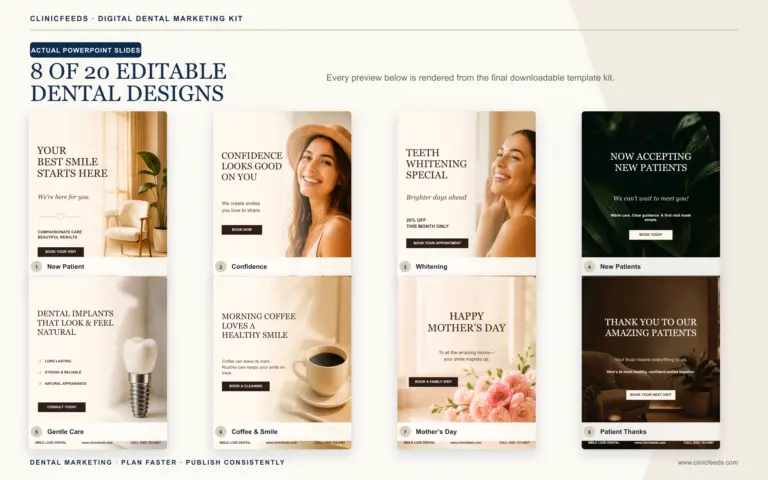
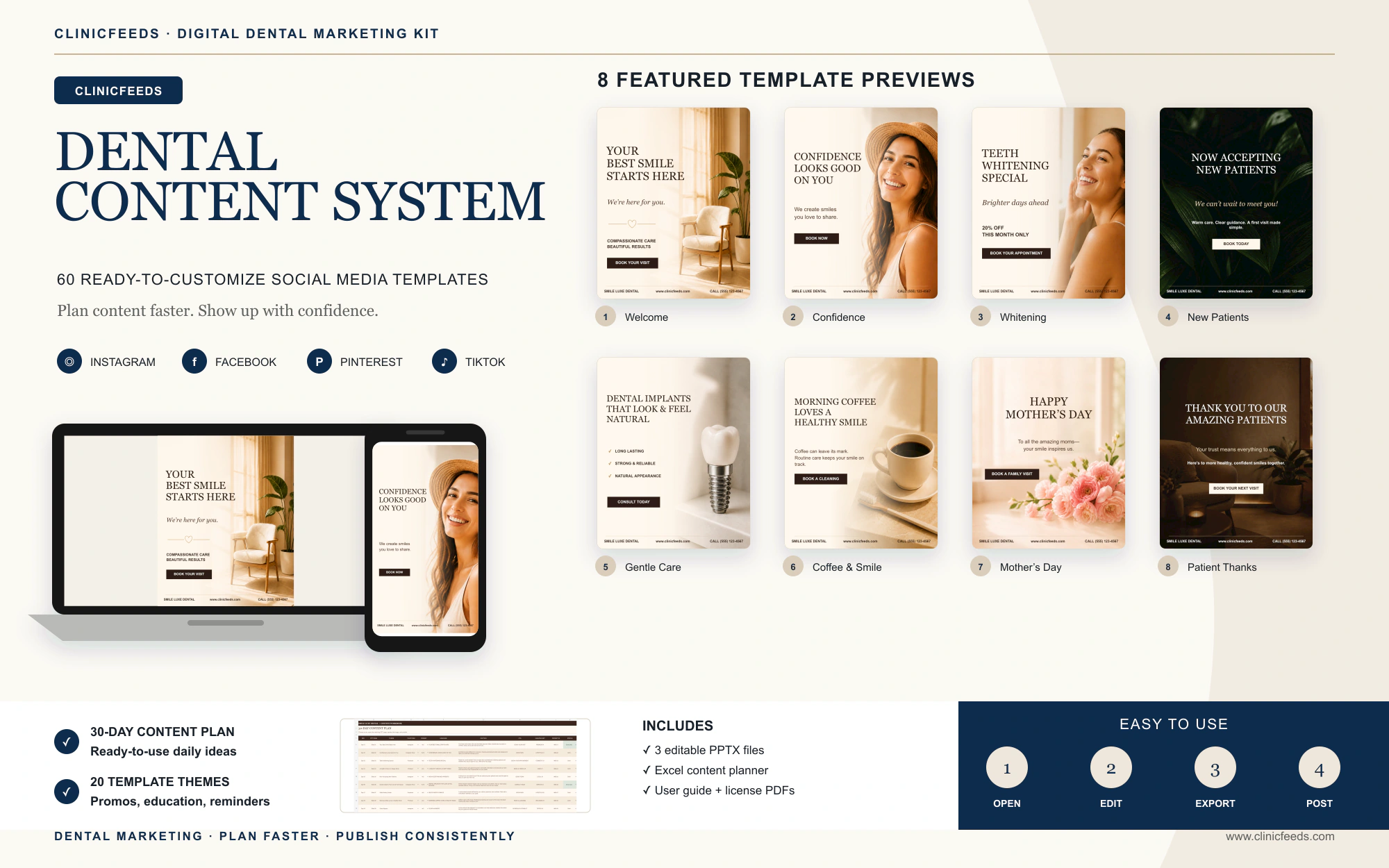
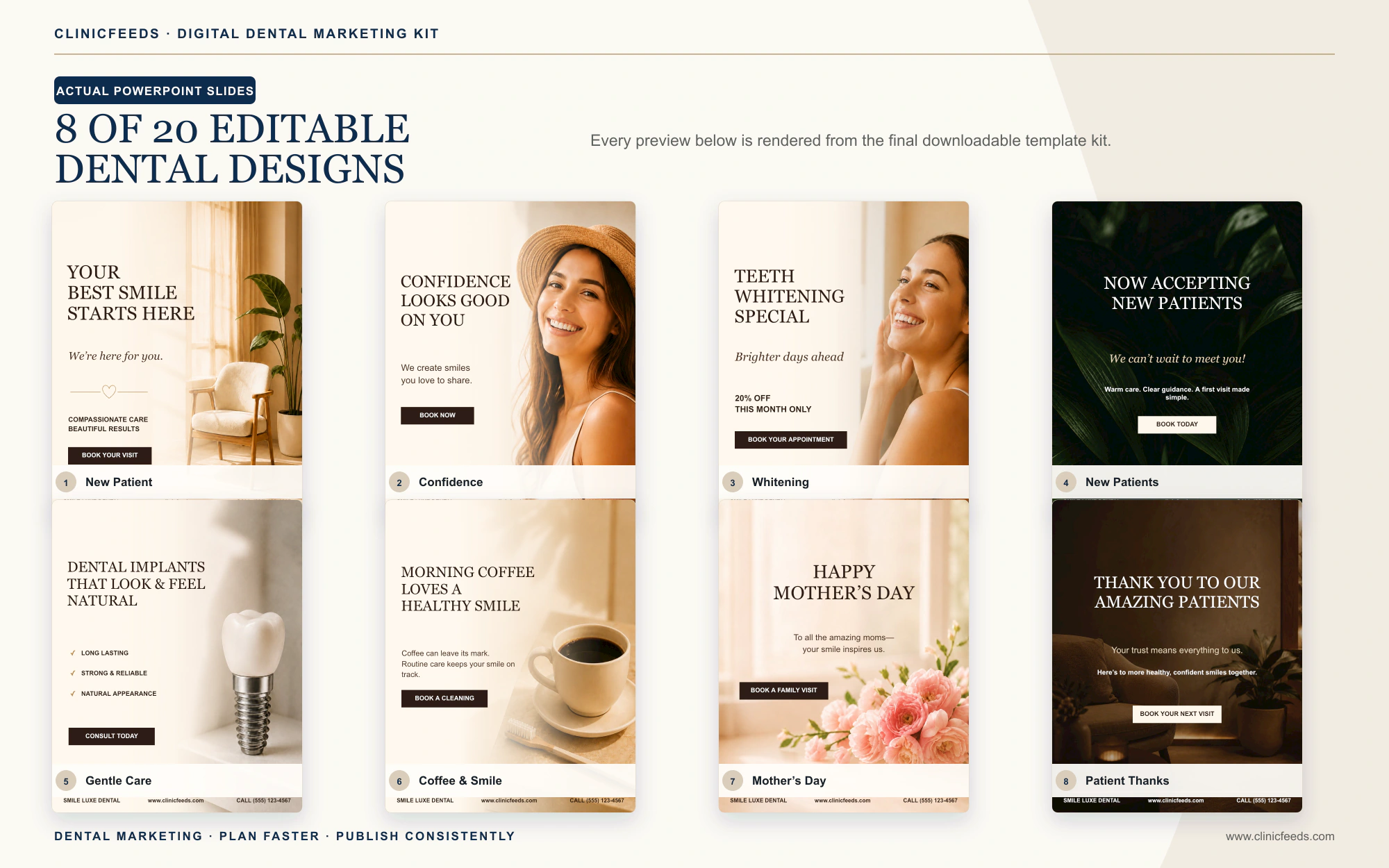
The Smile Luxe kit contains 20 core dental themes. Each theme is supplied in three formats: Instagram and Facebook Feed, Instagram and Facebook Story or Reels, and Pinterest Pin. The result is 60 editable PowerPoint pages, not 60 unrelated content ideas.
A clinic could organize the 20 themes into a monthly mix such as:
- Four education posts: preventive care, a smile-care checklist, children’s dental care, and a common patient question.
- Four service posts: whitening, clear aligners, veneers, and implants, reviewed against the clinic’s actual services.
- Three trust posts: a team value, a patient-approved story, and a thank-you message.
- Three appointment posts: new-patient availability, emergency dental care, and a booking reminder.
- Two seasonal posts: timely messages that fit the practice calendar.
- Four flexible slots: office news, a team photo, an event, a revised campaign, or a local reminder.
The same message can then be published in the correct composition for each supported platform. If Instagram is the clinic’s main channel, use What Should a Dentist Post on Instagram? to refine the monthly topic mix.
A Five-Step Monthly Production Workflow
- Set the month’s priorities. Choose one or two services, several patient questions, and any genuine seasonal or office updates.
- Assign the content mix. Select education, service, trust, reminder, and flexible posts before editing graphics.
- Customize in batches. Replace clinic details, copy, colors, and approved images across several posts in one session.
- Review image and caption together. Check privacy, treatment language, offer terms, phone numbers, links, and platform format.
- Export and schedule. Save the correct Feed, Story or Reels, and Pinterest versions, then publish through the clinic’s usual tools.
Batching reduces setup time and makes errors easier to catch. The practice can choose topics and gather approved assets first, customize several posts together, and complete one review round before scheduling.
Review Patient Privacy and Advertising Claims Before Publishing
Templates organize the message; they do not approve it. The clinic remains responsible for every photo, testimonial, treatment statement, price, and offer it publishes.
For U.S. practices, the Department of Health and Human Services explains that uses or disclosures of protected health information for marketing generally require valid authorization, subject to specific exceptions. HHS has also taken enforcement action against a dental practice for disclosing patient information while responding to online reviews. Review the HHS marketing guidance and the dental practice enforcement example with the practice’s compliance adviser.
- Use clinic-owned, properly licensed, or appropriately authorized images.
- Do not disclose patient information when replying to reviews or comments.
- Remove guaranteed outcomes and claims the practice cannot support.
- Confirm prices, dates, exclusions, and availability before publishing an offer.
The American Dental Association’s social media checklist provides an additional review starting point. The FTC’s endorsement guidance explains that testimonials and endorsements must be truthful and not misleading. Clinics outside the United States should follow the privacy, professional, and advertising rules in their own jurisdictions.
This section provides general marketing information, not legal or clinical advice.
Who the Smile Luxe Kit Is For (and Who It Is Not For)
The Smile Luxe Dental Social Media Template Kit uses warm ivory, cream, champagne, and espresso tones instead of a standard medical-blue style. Text, CTAs, clinic details, colors, and image layers can be changed directly in PowerPoint.
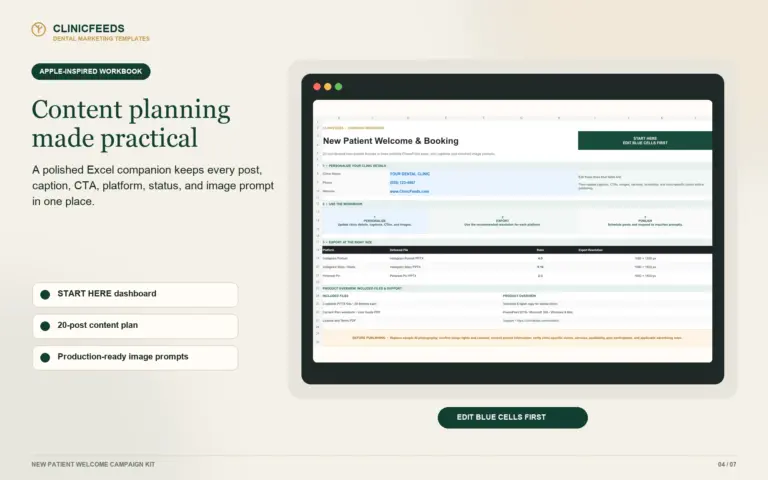
The download includes three PPTX files, an Excel workbook with a 30-day plan, captions, hashtags, 20 AI image prompts and a four-week posting plan, plus a user guide and license terms.
It is a good fit for
- Private, family, cosmetic, and boutique dental practices that want a warm editorial visual direction.
- Practice managers and small in-house teams already comfortable with PowerPoint and Excel.
- Clinics that want reusable local files rather than a monthly template subscription.
- Agencies prepared to purchase a separate license for each client practice.
It is not designed to replace
- Animated video templates or a video editor.
- A social media scheduling and analytics platform.
- A custom dental marketing strategy or agency approval process.
- A multi-client source-file license shared across different practices.
Browse the wider dental social media template collection to compare other ClinicFeeds dental content systems.
Frequently Asked Questions
Are free dental social media templates enough for a private practice?
They may be enough for occasional posts when someone on the team can find matching designs, rewrite the copy, resize the files, and check the license. A coordinated paid kit saves more time when the clinic publishes consistently across several platforms.
Can dentists edit social media templates without Canva?
Yes. PPTX templates can be edited in Microsoft PowerPoint. The team can replace text and images, change clinic colors and contact details, and export the finished slides as PNG or JPG files without opening a Canva account.
What should a dental social media content kit include?
Look for editable platform-sized graphics, topics that match the practice, clear image replacement, planning resources, and written license terms. Captions, hashtags, calendars, and usage instructions reduce the separate tasks required before a post is ready.
What sizes should dental Instagram, Facebook, and Pinterest templates use?
The Smile Luxe kit uses 4:5 files for Instagram and Facebook feeds, 9:16 files for Instagram and Facebook Stories or Reels, and 2:3 files for Pinterest Pins. Check current platform specifications before publishing.
Is a one-time template kit better than a monthly dental content subscription?
A one-time kit fits teams that want reusable source files and can work from a fixed topic library. A subscription fits clinics that value newly released content each month and accept recurring fees and the provider’s editing workflow.
Choose the Workflow Your Team Will Actually Use
Page count matters less than fit. The templates should cover the clinic’s real topics, open in software the team already understands, match the required platforms, and include terms that support the intended use.
For a broader PowerPoint-based library, review the Dental Social Media Template Bundle: three coordinated kits, 60 content themes, 180 platform-ready pages, and three Excel planners licensed to one dental clinic location.
Sources And Review Notes
- American Dental Association: Social Media Checklist
- FTC: Advertising, Endorsements and Testimonials
- HHS: HIPAA Guidance on Marketing
- HHS: Dental Practice Online Review Enforcement
Last reviewed: July 28, 2026.