
Quick answer: A practical 90-day dental social media plan uses a 12-week publishing cycle plus a six-day review buffer. At two core themes per week, select 24 of the bundle’s 60 themes; at three per week, select 36. Rotate everyday clinic content, new-patient communication, and hygiene education, then adapt each selected theme to Feed, Story/Reels, and Pinterest without counting those sizes as separate topics.
This approach is designed for a private dental practice that wants a quarter of organized content without promising that a busy team will publish every day. It starts with the clinic’s actual production and review capacity, then uses the ClinicFeeds Dental Social Media Template Bundle as a source library rather than a rigid posting schedule.
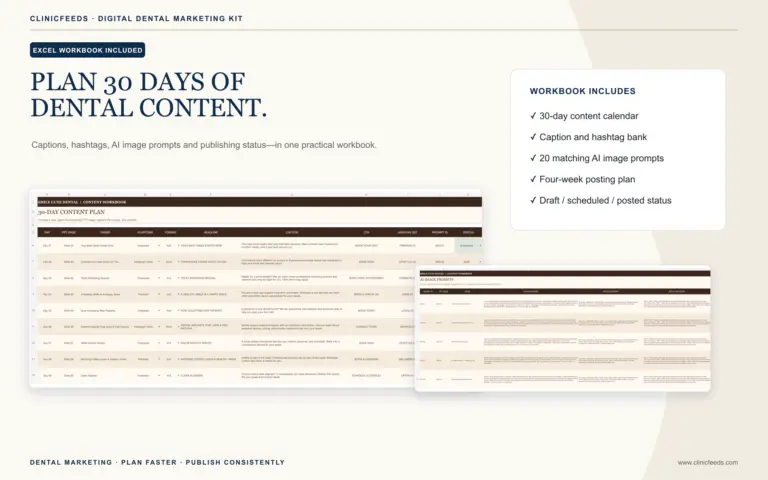
Important product distinction: the bundle includes three separate Excel content planners—one for Smile Luxe, one for New Patient Welcome, and one for Dental Hygiene & Gum Health. It does not include an automated 90-day calendar or a social media scheduling service. The workflow below shows how a clinic can combine selected themes from those three planners into its own quarterly plan.
A strategy decides the practice goal, patient audience, platform roles, approval ownership, and measurement before dates are assigned. If those decisions are not yet documented, use the dental social media marketing strategy guide first; return here to build the 12-week execution schedule.
What Makes This Different From a 30-Day Dental Content Calendar?
A monthly calendar helps a practice decide what to publish during one month. A 90-day plan has a different job: it prevents one campaign from taking over the feed, reserves enough useful topics for later months, and gives the team time to review what is still accurate before reusing anything.
If you first need to decide how education, service awareness, trust, reminders, and seasonal posts should fit into one month, start with the existing guide to building a 30-day dental social media content calendar. Use this article when the monthly structure is already understood and the next problem is selecting and rotating content across a full quarter.
Start With the Correct Inventory: 60 Themes, Not 180 Topics
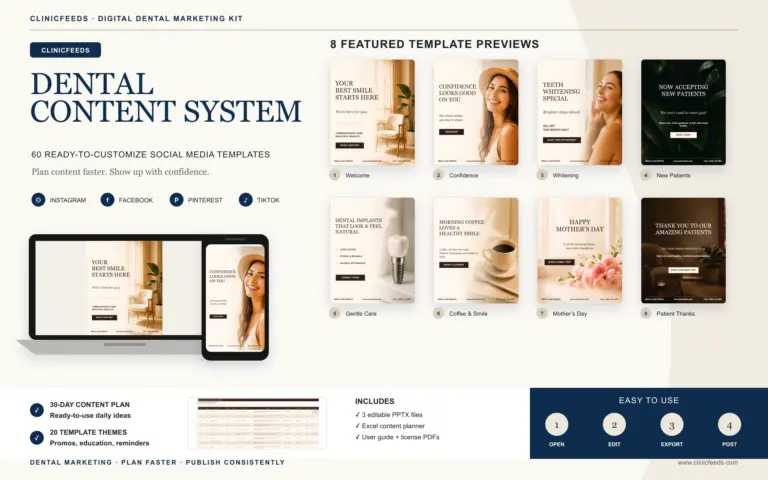
The bundle contains 60 distinct content themes across three dental content tracks:
- 20 Smile Luxe themes for recurring clinic communication, patient education, service awareness, trust-building, reminders, seasonal content, and booking prompts.
- 20 New Patient Welcome themes for practice introductions, first-visit expectations, common preparation questions, team familiarity, and appropriate appointment invitations.
- 20 Dental Hygiene & Gum Health themes for preventive education, cleaning visits, daily habits, gum-health conversations, common questions, reminders, and appropriate booking prompts.
Each theme is supplied as three separately arranged PowerPoint pages:
- 4:5 at 1080 × 1350 px for Instagram Feed and compatible Facebook feed placements after previewing;
- 9:16 at 1080 × 1920 px for static Story/Reels graphics;
- 2:3 at 1000 × 1500 px for Pinterest Pins.
That creates 180 editable PowerPoint pages, but it does not create 180 unrelated editorial ideas. When the clinic selects one hygiene theme for a week, its Feed, Story/Reels, and Pinterest versions are three placements for the same core message. Treating them as three separate topics makes the calendar look full while repeating the same idea to the audience.
Choose a Posting Capacity Before Choosing Topics
Do not begin by filling every date. First decide how many core themes the team can customize, review, export, schedule, and monitor without delaying front-office or clinical work.
| Capacity | Core themes over 12 weeks | Suggested mix | Themes kept in reserve |
|---|---|---|---|
| 2 themes per week | 24 | 12 everyday + 6 new-patient + 6 hygiene | 36 |
| 3 themes per week | 36 | 12 everyday + 12 new-patient + 12 hygiene | 24 |
The two-theme plan is usually easier for a small practice with one person handling marketing alongside other duties. The three-theme plan gives every content track a regular weekly place, but it also creates more customization and approval work. Neither cadence is automatically better. The best choice is the one the clinic can maintain after a busy schedule change, staff absence, or campaign revision.
The selected themes are the editorial workload. Reusing a selected theme in a second platform size is distribution work, not an additional theme. For example, the clinic might publish the 4:5 version in Feed, use the 9:16 version as a Story reminder later in the week, and save the 2:3 version to an appropriate Pinterest board. Preview every export in the destination platform because interfaces, overlays, and safe areas can change.
Use a 12-Week Rotation Plus a Six-Day Review Buffer
Ninety days are longer than 12 weeks: 12 weeks equal 84 days. Use the remaining six days as a review and preparation buffer rather than forcing extra posts into the plan. That buffer gives the practice time to check results, archive expired material, confirm next-quarter priorities, and approve the next batch.
Three-theme weekly rotation
For a team that can support three core themes each week, the simplest rotation is one theme from each included kit. The table below describes the job each theme should perform; the clinic should select the specific matching theme from the appropriate workbook.
| Week | Smile Luxe: everyday clinic track | New Patient Welcome track | Hygiene & Gum Health track | Operational check |
|---|---|---|---|---|
| 1 | Practice orientation or trust | Who the clinic welcomes | Preventive-care orientation | Verify phone, website, hours, and booking route |
| 2 | Common patient question | What a first visit involves | Daily home-care habit | Assign clinical reviewer and approval date |
| 3 | Service awareness | Meet the practice or team | Cleaning-visit education | Confirm services and provider information |
| 4 | Reminder or practical next step | First-visit preparation | Gum-health question | Review month-one workload and response path |
| 5 | Patient-friendly education | Comfort or uncertainty reduction | Preventive routine | Replace outdated or unlicensed images |
| 6 | Clinic value or care approach | What to bring or prepare | Common cleaning question | Check wording about insurance, benefits, and fees |
| 7 | Trust-building or team context | How to request an appointment | Gum-health education | Confirm permissions for identifiable people |
| 8 | Seasonal or timely clinic message | New-patient FAQ | Recall or hygiene reminder | Review month-two performance by content track |
| 9 | Recurring care education | Practice location or access information | Daily habit reinforcement | Verify directions, hours, and contact details |
| 10 | Service conversation starter | First-visit expectations | Preventive-care question | Repeat clinical and advertising review |
| 11 | Clinic trust or communication value | New-patient next step | Hygiene appointment context | Remove expired dates, promotions, or staffing details |
| 12 | Quarter recap or reminder | Frequently asked question | Prevention recap | Complete quarterly review and mark reusable assets |
This is a rotation framework, not a claim that every listed use case appears under that exact title inside the product. Select the closest relevant theme from each kit, then customize the message to the clinic’s actual services and patient communication priorities.
Two-theme weekly rotation
If the practice can reliably manage only two core themes per week, use one Smile Luxe theme every week as the recurring clinic anchor. Alternate the second position between New Patient Welcome and Hygiene & Gum Health:
- Odd-numbered weeks: one Smile Luxe theme + one New Patient Welcome theme.
- Even-numbered weeks: one Smile Luxe theme + one Hygiene & Gum Health theme.
This produces 24 core themes across 12 weeks: 12 everyday, six new-patient, and six hygiene themes. The unused themes are not wasted. They remain available for the next quarter, seasonal substitutions, campaign changes, or weeks when one planned topic is no longer accurate.
Plan by Theme First, Then Assign Platform Placements
Keep the editorial decision separate from the platform decision. In the master plan, record one row for each selected theme and then add columns for the placements that the team will actually use.
| Planning field | What to record |
|---|---|
| Track | Smile Luxe, New Patient Welcome, or Hygiene & Gum Health |
| Core theme | The selected topic from that kit’s Excel planner |
| Primary job | Educate, orient, build trust, remind, or invite an appropriate next step |
| Clinic customization | Approved wording, clinic details, image, service availability, and CTA |
| Placements | 4:5 Feed/Facebook, 9:16 Story/Reels, 2:3 Pinterest—or only the placements the clinic maintains |
| Owner and reviewer | Person preparing the asset and person giving final approval |
| Status | Selected, Draft, In Review, Approved, Scheduled, Published, or Archived |
| Expiry or recheck date | Date to reconfirm an offer, service, provider, office detail, image permission, or clinical statement |
The 2:3 Pinterest version can remain useful longer when it leads to evergreen patient education, but it still needs a current destination page and accurate clinic information. A 9:16 Story version may be used closer to an appointment prompt or timely reminder. The 4:5 version can act as the main feed asset. These are operational options, not requirements to maintain every platform.
For a detailed cross-platform workflow, see how to repurpose one dental topic for Instagram, Facebook, and Pinterest.
Batch the Quarter Without Creating an Approval Bottleneck
Batching does not have to mean finishing 36 themes in one sitting. A safer process separates selection, customization, clinical review, and scheduling so the correct person can review each stage.
- Select the quarter. Choose 24 or 36 themes from the three workbooks. Record why each theme is relevant now and which themes should stay in reserve.
- Map the 12 weeks. Assign one core theme to each planned publishing position. Leave space for real clinic announcements rather than filling every date.
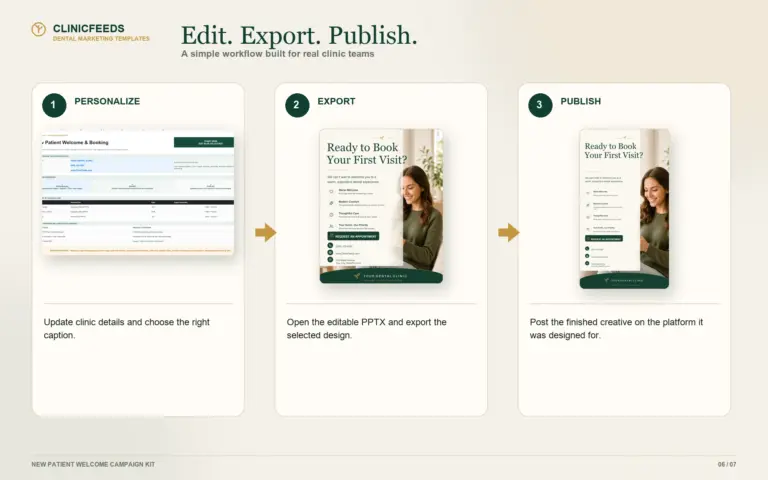
- Customize in monthly blocks. Prepare four weeks at a time. Replace sample wording, clinic name, contact information, colors, images, service details, and calls to action.
- Review before export. Confirm clinical accuracy, privacy, permissions, claims, offers, fees, insurance or benefit wording, provider details, and the destination link.
- Export the needed sizes. Export only the approved platform versions as PNG or JPG. Preview them inside each destination platform.
- Schedule with ownership. Record who schedules, who monitors replies, and where appointment inquiries should go.
- Keep the editable master. Preserve the PPTX file as the master; do not overwrite it with a platform-specific export.
If your team is new to the files, follow the separate guide to customizing dental social media templates in PowerPoint before building the full quarter.
Review the Plan at the End of Each Month
Do not wait until day 90 to find out that the plan was too ambitious or that an outdated offer remained scheduled. Add a short operational review after weeks 4, 8, and 12.
Workload review
- How many themes were approved and published as planned?
- Where did work stall: selection, customization, clinical review, image approval, scheduling, or follow-up?
- Should the next month remain at three themes per week or move to two?
Message and response review
- Which content track produced useful actions such as profile visits, booking-page visits, calls, direct inquiries, or saved educational posts?
- Did the call to action lead to a page or contact route the front office could support?
- Did new-patient content answer real questions, or did it repeat general brand language?
- Did hygiene content explain a useful next step without diagnosing or making a universal treatment claim?
Accuracy and expiry review
- Archive or update expired promotions, dates, fees, office hours, staff names, provider availability, and insurance or benefit wording.
- Recheck image rights and the scope of any patient authorization before reusing identifiable content.
- Confirm that clinical statements and links still match the clinic’s current services.
- Mark evergreen assets as reusable only after the review is complete.
Likes alone do not show whether the plan supports the patient journey. Compare each content track with the action it was designed to support, and change the next month’s selection when the operational result does not match the intended job.
North American Review Notes for Dental Practices
This workflow is a marketing planning method, not legal, regulatory, or clinical advice. Every practice must review its own jurisdiction, professional rules, patient-consent process, advertising standards, and platform requirements before publishing.
United States: the American Dental Association recommends developing a content calendar and reminds practices that social media requires regular monitoring and appropriate responses. Where protected health information is used or disclosed for marketing, the U.S. Department of Health and Human Services explains that a valid individual authorization is generally required, subject to limited exceptions. Do not assume that blurring a patient or background information fixes an unauthorized disclosure.
Canada: requirements can vary by province, territory, regulator, and context. Ontario’s Royal College of Dental Surgeons states that professional obligations extend online and illustrates why consent must cover the scope and platform of image use. A consent that allows a photo on a clinic website does not automatically authorize a different disclosure on another social platform. Practices outside Ontario should review the rules and guidance that apply in their own jurisdiction.
Use the Bundle as a Quarterly Source Library
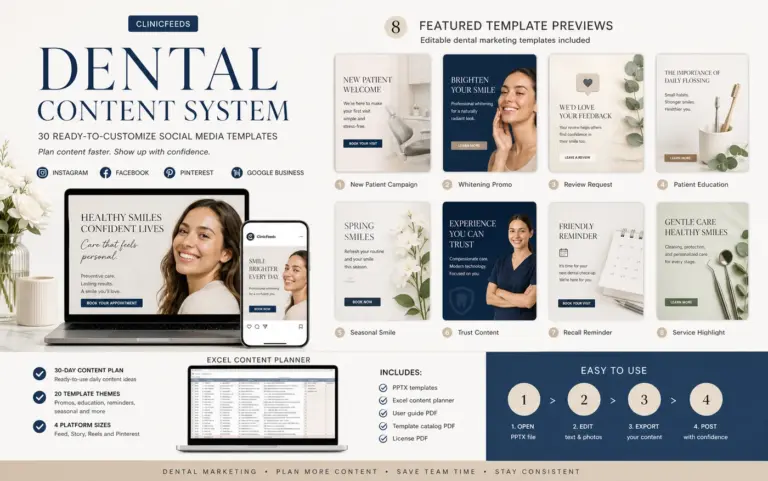
The Dental Social Media Template Bundle costs US$59 and combines the complete Smile Luxe, New Patient Welcome, and Dental Hygiene & Gum Health kits. It includes 60 themes supplied as 180 editable PowerPoint pages in 4:5, 9:16, and 2:3 formats, plus three Excel content planners and six PDF documents.
Canva is not required. One purchase licenses the files to one dental clinic location. The bundle supplies editable content and planning resources—not an automated 90-day calendar, scheduling service, clinical review, or guaranteed marketing result. The clinic remains responsible for customization, approvals, publishing, patient follow-up, and compliance.
If the team still needs to compare available kits, planning guides, and workflow resources before choosing a product, begin at the Dental Social Media Content System.
Review the three included dental kits and complete file list.
Frequently Asked Questions
Does the bundle include an automated 90-day dental social media calendar?
No. It includes three separate Excel content-planning workbooks, one for each included kit. A clinic can select and combine themes from those workbooks to build the 12-week rotation described here, but the product does not automatically create or schedule a 90-day calendar.
Do I need to publish all 60 dental content themes in 90 days?
No. Publishing two core themes per week uses 24 themes over 12 weeks. Publishing three per week uses 36. Keeping the remaining themes in reserve gives the clinic options for the next quarter, seasonal changes, or substitutions when a planned post becomes inaccurate.
Are the 180 PowerPoint pages 180 different post ideas?
No. The bundle contains 60 themes. Each theme is supplied in three separately arranged sizes—4:5, 9:16, and 2:3—creating 180 editable pages in total.
How many times per week should a dental practice post?
Choose the number of core themes the team can consistently customize, review, publish, and monitor. This plan provides two-theme and three-theme weekly options rather than claiming one universal posting frequency for every practice.
Can one purchase be used for several dental locations?
No. One purchase licenses the bundle to one dental clinic location. Each additional location requires a separate purchase, including another location owned by the same organization.
Can a Canadian dental clinic use the plan and bundle?
Yes. The English-language files can be customized by Canadian practices, but the checkout price is in U.S. dollars and the clinic must review the privacy, consent, professional, and advertising requirements that apply in its province or territory.
Sources and Review Notes
- American Dental Association: Social Media—Introduction
- American Dental Association: Checklist for Engaging in Social Media
- U.S. Department of Health and Human Services: When Patient Authorization Is Required for Marketing
- U.S. Department of Health and Human Services: Media Access, Filming, and Prior Authorization
- Royal College of Dental Surgeons of Ontario: Use of Social Media
Last reviewed: August 4, 2026. Platform interfaces, professional guidance, and clinic information can change; verify them before publishing or reusing an asset.