Quick Answer
Useful dental Facebook post ideas help a practice answer common questions, introduce the team, share timely office information and give local patients a clear next step. A practical monthly mix includes patient education, trust-building, community updates, appointment reminders and a small number of service or offer posts.
The 30 ideas below are designed for private dental practices in the United States and Canada. Each idea includes a purpose, a suggested visual and a call to action. Replace every bracketed detail, verify clinical and offer information, and obtain the required permission before sharing identifiable patient content.
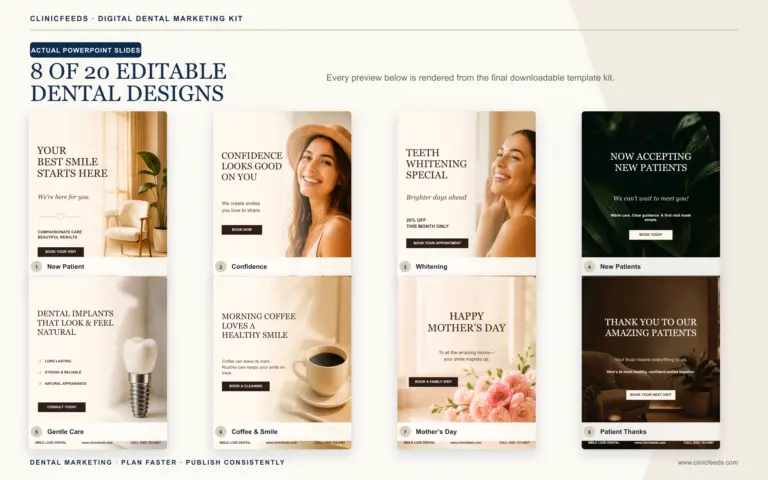
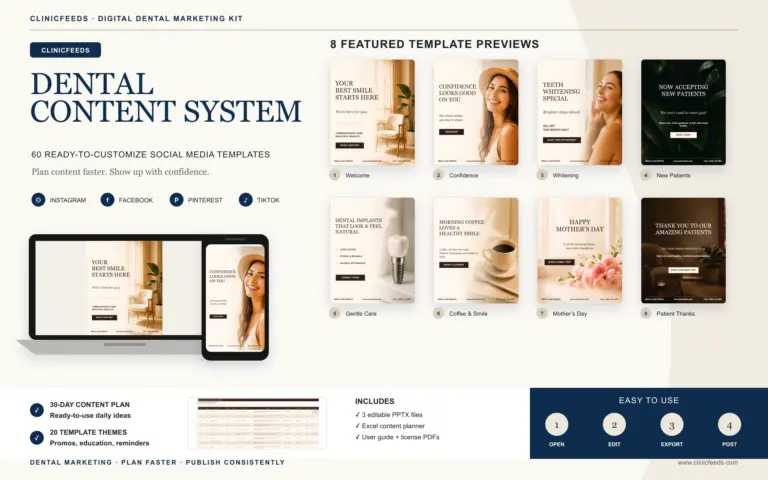
Need the editable visual version? The Smile Luxe Dental Kit includes 20 coordinated 4:5 Feed templates suitable for Facebook and Instagram, plus 9:16 Story/Reels and 2:3 Pinterest versions of the same 20 campaign themes. Review the 60-template dental kit.
Why Facebook Needs Its Own Dental Content Plan
A dental practice can reuse the same campaign theme across Facebook and Instagram, but the post should not be copied without review. Facebook is useful for local updates, links, events, longer explanations, community conversations and posts that family members may share with one another. Instagram usually places more emphasis on the visual and a faster-scanning caption.
For Facebook, give readers enough context to understand the post without relying on the image alone. Use one clear topic, a readable visual and one relevant action such as reading a service page, calling the office, requesting an appointment or saving an office update.
Use the dental Instagram caption examples when adapting the same approved campaign theme for Instagram.
Choose that topic from the practice priority, not from the platform alone. The dental office marketing ideas guide helps teams decide whether Facebook should support visibility, patient education, appointment follow-through or another operational goal.
30 Dental Office Facebook Post Ideas
Patient Education Posts
- What happens during a routine dental exam? Explain the high-level purpose of the visit without promising that every appointment includes the same procedures. Visual: a simple exam checklist. CTA: “Learn what to expect at [link].”
- Brushing technique reminder. Share one practical technique your clinical team has reviewed. Keep the post general and invite patients to ask what is appropriate for them. Visual: three-step illustrated routine. CTA: “Save this for tonight.”
- Floss, interdental brush or water flosser? Explain that different tools suit different needs and that a dental professional can provide individualized guidance. Visual: labeled tool comparison. CTA: “Bring your questions to your next visit.”
- Why gums may bleed. Explain that bleeding can have more than one cause and should not be diagnosed in a comment thread. Visual: calm educational graphic. CTA: “Contact the office if you are concerned.”
- Dental sensitivity: what to notice. Suggest noting when sensitivity occurs, what triggers it and how long it lasts before discussing it with the dentist. Visual: a simple observation checklist. CTA: “Use this list before your appointment.”
- When to replace a toothbrush or brush head. Use the manufacturer’s guidance and visible bristle wear as prompts rather than making an absolute rule for everyone. Visual: new versus worn bristles. CTA: “Check yours today.”
Practice Trust And Team Posts
- Meet the dentist. Introduce training, professional interests and one factual detail about the approach to patient communication. Avoid unsupported superlatives. Visual: a current clinic portrait. CTA: “Meet the team at [link].”
- Meet a hygienist, assistant or coordinator. Explain the team member’s real responsibilities and how they support the patient experience. Obtain the employee’s approval before posting. Visual: workplace portrait. CTA: “Say hello at your next visit.”
- Behind the morning setup. Show a non-patient area while the team prepares for the day. Check the background for names, schedules, screens or other private information. Visual: treatment room detail or supply setup. CTA: “See how our day begins.”
- How the practice explains treatment options. Describe the process: assessment, questions, discussion of alternatives and informed decision-making. Visual: consultation workspace. CTA: “Learn about our approach.”
- Technology with a practical purpose. Explain what an actual piece of equipment helps the team do without calling it “the best,” “state of the art” or a guarantee of results. Visual: approved equipment photo. CTA: “Ask how it may be used during care.”
- Team training or continuing education. Share a completed training session and why the topic matters to the practice. Do not imply a specialty or credential the dentist does not hold. Visual: team photo or certificate detail. CTA: “Meet the people behind [Practice Name].”
Local Community And Practice Updates
- Holiday office hours. Publish the exact closure and reopening dates, emergency contact route and link to current hours. Visual: branded calendar graphic. CTA: “Save these dates.”
- Community event participation. Share a local school, charity or neighbourhood event the practice is genuinely supporting. Confirm tagging and photography permissions. Visual: event graphic or approved team image. CTA: “Find event details here.”
- Parking, transit or construction update. Give patients useful arrival information when access changes. Visual: simple map or entrance photo. CTA: “Check directions before your visit.”
- New office feature. Introduce an accessibility improvement, updated waiting area or practical service change. Describe what changed, not how impressive it is. Visual: real office photo. CTA: “Contact us if you need an accommodation.”
- Practice milestone. Mark an anniversary, move or team achievement using accurate dates and a community-focused thank-you. Visual: archival and current image pair. CTA: “Thank you for being part of our story.”
Appointment And Front Desk Posts
- Now accepting new patients. State which location is accepting requests, how to contact the office and whether the form is a request rather than an immediate confirmation. Visual: first-visit information card. CTA: “Request an appointment.”
- What to bring to a first visit. List only the information your office actually requests, such as identification, medication information or insurance details where applicable. Visual: first-visit checklist. CTA: “Review the full instructions.”
- School-break scheduling reminder. Encourage families to plan early without suggesting appointment availability that has not been confirmed. Visual: school calendar reminder. CTA: “Contact the scheduling team.”
- Year-end benefits reminder. Explain that coverage and eligibility vary and that appointment availability is limited by the real schedule. Visual: neutral calendar graphic. CTA: “Check your plan and contact us early.”
- Weather or service disruption update. Post the verified opening status and explain how affected patients will be contacted. Visual: high-contrast status graphic. CTA: “See the latest update here.”
Service Awareness And Offer Posts
For a time-bound offer, confirm capacity, dates, eligibility and the landing page before designing the post. Use the dental office promotion planning guide to connect the Facebook creative with front-desk preparation and campaign measurement.
- Teeth whitening consultation. Explain who should start with an assessment, how options may differ and why outcomes vary. Visual: service overview, not an exaggerated result. CTA: “Request a consultation.”
- Clear aligner questions. Answer one common question about assessment, timing or follow-up. Do not imply that every reader is a candidate. Visual: question-and-answer graphic. CTA: “Discuss your options with a dentist.”
- Dental implant information. Focus on one stage such as assessment, planning or maintenance rather than compressing the full process into a sales claim. Visual: approved educational illustration. CTA: “Read the treatment overview.”
- Time-limited practice offer. State the service, exact price or discount, eligibility, exclusions and end date where offers are permitted. Visual: clear terms-first graphic. CTA: “Review the full offer details.”
Conversation And Engagement Posts
- Ask a general planning question. “What would make a dental visit easier to prepare for?” Remind people not to share personal health information in comments. Visual: simple question card. CTA: “Share a general answer below.”
- Myth or fact. Choose one claim the clinical team can support and explain the answer in the post rather than using a misleading clickbait reveal. Visual: myth/fact template. CTA: “Save the explanation.”
- Choose the next education topic. Offer three broad subjects such as sensitivity, first visits or home-care routines. Visual: numbered options. CTA: “Vote with 1, 2 or 3.”
- Local smile routine prompt. Tie an everyday habit to a season, travel period or community event without giving individualized treatment advice. Visual: seasonal checklist. CTA: “Which reminder would help you this week?”
Five Ready-To-Adapt Facebook Post Examples
New Patient Post
New to [City]? [Practice Name] is currently welcoming new patient appointment requests at our [Location] office. A first visit begins with a conversation, an appropriate assessment and time for your questions. Learn what to expect and request a time here: [link]. Appointment availability is confirmed by our team.
Patient Education Post
Dental sensitivity can have more than one cause. Before your next visit, note when it happens, what seems to trigger it and how long it lasts. That information can help your dental team understand the concern. For personal guidance, contact [Practice Name] directly rather than posting health details in the comments.
Team Introduction Post
Meet [Name], [Role] at [Practice Name]. [Name] helps our patients by [specific, accurate responsibility]. Outside the clinic, [approved personal detail]. Please join us in saying hello.
Office Update Post
Office hours update: [Practice Name] will be closed on [date] and will reopen on [date] at [time]. Current contact information and instructions for urgent concerns are available here: [link]. Patients with affected appointments will be contacted directly.
Service Awareness Post
Considering professional teeth whitening? The first step is understanding the available options and whether treatment is appropriate for you. Results and timing vary. Request a consultation with [Practice Name]: [link].
A Four-Week Dental Facebook Posting Plan
Start with three posts per week. This is enough to create a visible rhythm without giving a small team an unrealistic daily publishing workload.
| Week | Post 1 | Post 2 | Post 3 |
|---|---|---|---|
| Week 1 | Patient education | Team introduction | Appointment or first-visit post |
| Week 2 | Common service question | Behind-the-scenes trust post | Local community update |
| Week 3 | Home-care reminder | Myth or fact | Service awareness or offer |
| Week 4 | Patient preparation | Practice values or process | General audience question |
Use the same five content themes that support the wider ClinicFeeds system: education, promotion, results or proof where properly authorized, trust and reminders. The exact mix should reflect the practice’s current priorities and the information the team can verify.
How To Turn One Idea Into A Facebook Post
- Choose one operational goal. Decide whether the post should answer a question, build familiarity, reduce appointment friction or prompt a contact action.
- Verify the practice detail. Confirm services, office hours, location, clinician credentials, availability and offer terms.
- Create a readable visual. A 4:5 feed design gives the message room to breathe on mobile. Use 9:16 only when adapting the idea for Stories or Reels.
- Write for Facebook. Add enough context to make the post useful when it is shared. Do not depend on a short Instagram-style caption alone.
- Add one destination. Link to the most relevant service, contact, appointment or information page.
- Complete privacy and claims review. Check images, names, testimonials, clinical statements and offer details before publishing.
- Schedule and monitor. Meta allows Page managers to schedule posts in Meta Business Suite and review reach and engagement in Page Insights. Use those results to refine the next month.
For a wider planning framework, use the 30-day dental social media content calendar guide. You can also combine these platform-specific ideas with the broader list of dental social media content ideas and dental patient education post ideas.
What To Measure On A Dental Facebook Page
Do not judge every post by reactions alone. Review the metric that matches the post’s purpose:
- Reach: whether the post was distributed to the intended local audience.
- Engagement: comments, reactions, shares and meaningful clicks.
- Link clicks: whether readers moved to the relevant service or contact page.
- Page actions: calls, messages, direction requests or other actions available on the Page.
- Qualified inquiries: contacts the front desk can trace back to the content or campaign.
Record the topic, format, CTA and result in a simple monthly worksheet. After several weeks, reuse the content structures that create useful actions—not only the posts that collect the most reactions.
If the practice plans to boost a post or run a paid Facebook campaign, treat it as advertising rather than ordinary publishing. The dental advertising ideas guide explains how to pair the creative with a relevant landing page and appointment-level measurement.
US And Canada Publishing Checklist
This checklist is practical publishing guidance, not legal advice. The American Dental Association warns that social media does not change a dentist’s privacy, ethical or advertising obligations. An identifiable patient photo, story or even confirmation that someone is a patient may involve protected information. Obtain appropriate written authorization and follow the rules that apply to the practice.
In Canada, professional and privacy expectations also vary by province. The Royal College of Dental Surgeons of Ontario notes that consent for using an image in one context does not automatically authorize sharing it on another platform. Practices should define the permitted channels and uses when obtaining consent.
- Confirm all clinical statements with a qualified member of the practice.
- Do not diagnose a commenter or discuss personal health information publicly.
- Use patient images, testimonials and names only with the required authorization.
- Do not create or purchase false reviews or misleading testimonials.
- Disclose material relationships when a post endorses a product or service.
- State important offer conditions clearly and avoid guaranteed-result language.
- Check state, provincial and professional advertising requirements before publishing.
Use These Ideas With Editable Dental Templates
The Smile Luxe Dental Social Media Template Kit includes 60 editable PowerPoint pages in 4:5, 9:16 and 2:3 formats, plus a 30-day Excel content planner, captions, hashtags, AI image prompts and PDF guides. The 4:5 designs can support Facebook and Instagram feed content after the copy, clinic details and images are customized.
Explore the Dental Social Media Content System for additional planning resources, or follow the guide to customize dental templates in PowerPoint.
Frequently Asked Questions
What Should A Dentist Post On Facebook?
A dentist can post patient education, team introductions, office updates, community involvement, appointment preparation, common service questions and accurately described offers. The strongest posts connect one useful message to one clear next step.
How Often Should A Dental Practice Post On Facebook?
Choose a pace the team can prepare, review, and maintain. One to three approved core themes per week is a practical capacity test; increase only when accuracy and follow-up remain consistent. Use the dental social media posting frequency guide to set the cadence.
Can Dental Practices Use The Same Posts On Facebook And Instagram?
They can reuse the same campaign theme and visual system, but each post should be adapted. Facebook may need more context, a link or a community-focused angle, while Instagram often depends more heavily on the visual and caption structure.
Can A Dental Office Post Before-And-After Photos?
Only after confirming appropriate patient authorization, image handling, accuracy and local professional advertising requirements. Do not imply that another patient will receive the same result.
Should Every Facebook Post Include A Booking Link?
No. Educational and trust-building posts may ask readers to save, share or learn more. Add a booking or contact link when it is a natural next step for the specific topic.
Can A Dental Practice Schedule Facebook Posts?
Yes. Facebook Pages with the appropriate access can schedule posts through Meta Business Suite. Confirm the account time zone, review scheduled content before it publishes and assign someone to monitor comments and messages.
Sources And Review Notes
- Facebook Help Center: Schedule And Manage Page Posts
- Facebook Help Center: Page Post Insights
- American Dental Association: Marketing And Advertising
- American Dental Association: Social Media Policies For Dentists
- Federal Trade Commission: Consumer Reviews And Testimonials Rule
- RCDSO: Professional Use Of Social Media
Last reviewed: August 4, 2026.