Quick Answer
Useful dental Pinterest post ideas turn common patient questions into visual resources people can save for later. Strong topics include first-visit checklists, oral health routines, treatment consultation questions, family dental planning, seasonal reminders and links to detailed practice resources.
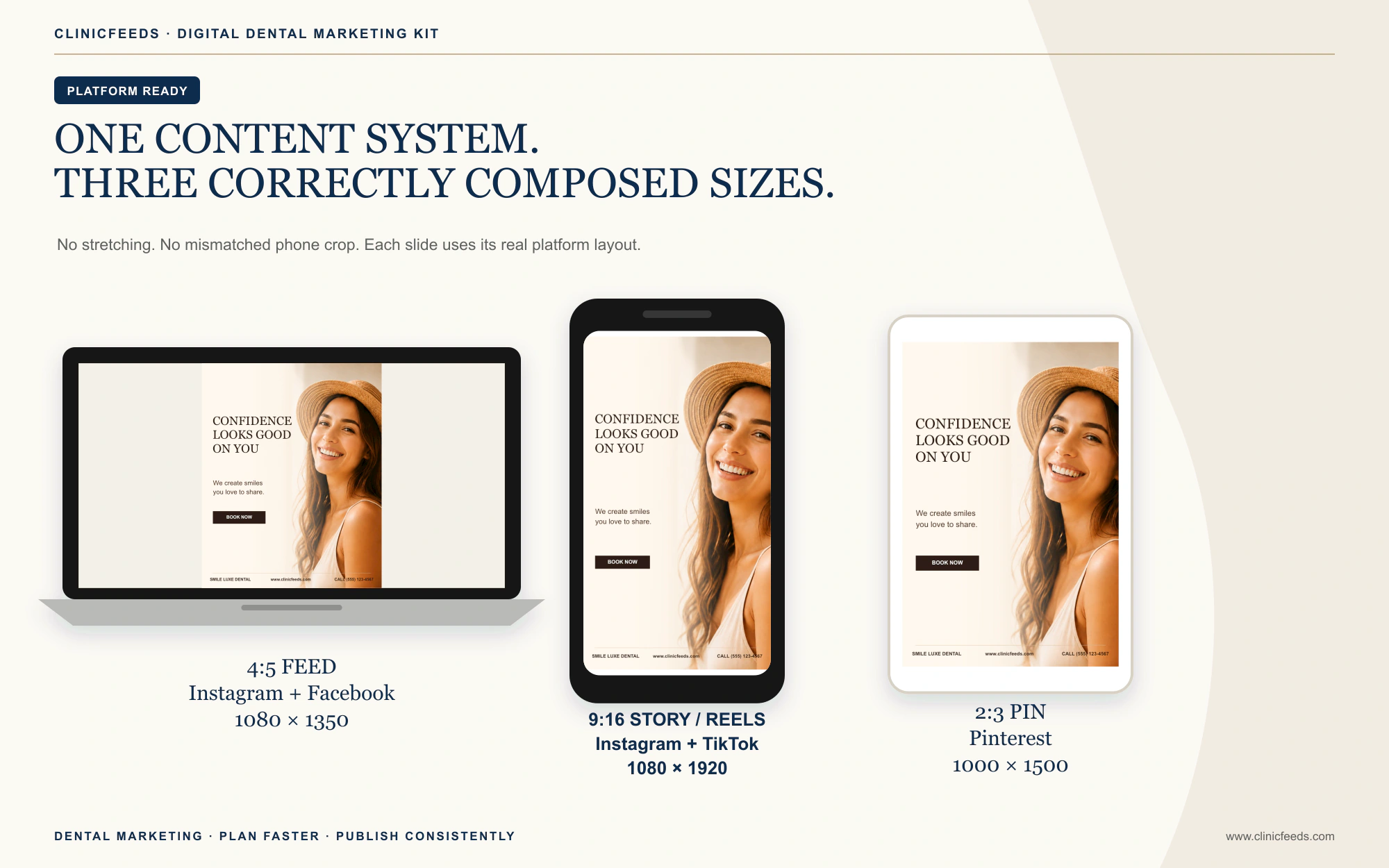
Pinterest should not be treated as another place to paste an Instagram caption. A Pin needs a clear visual promise, a searchable title, a useful description and a destination page that genuinely continues the topic. For ClinicFeeds products, use the included 2:3 Pinterest source file rather than stretching a 4:5 or 9:16 design.
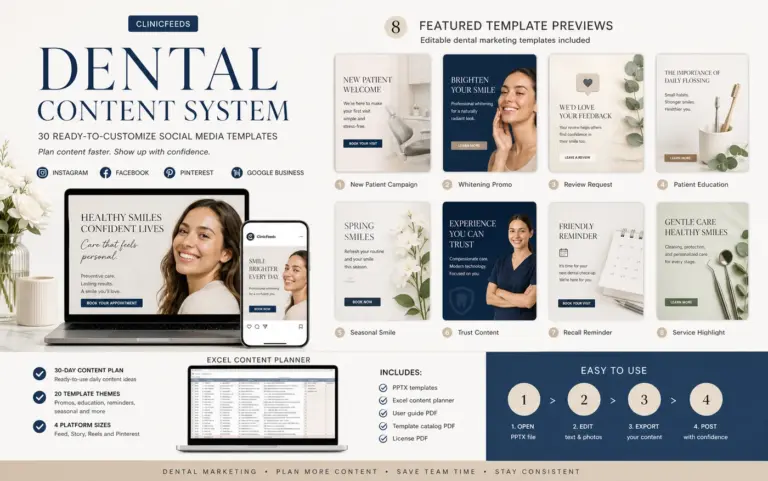
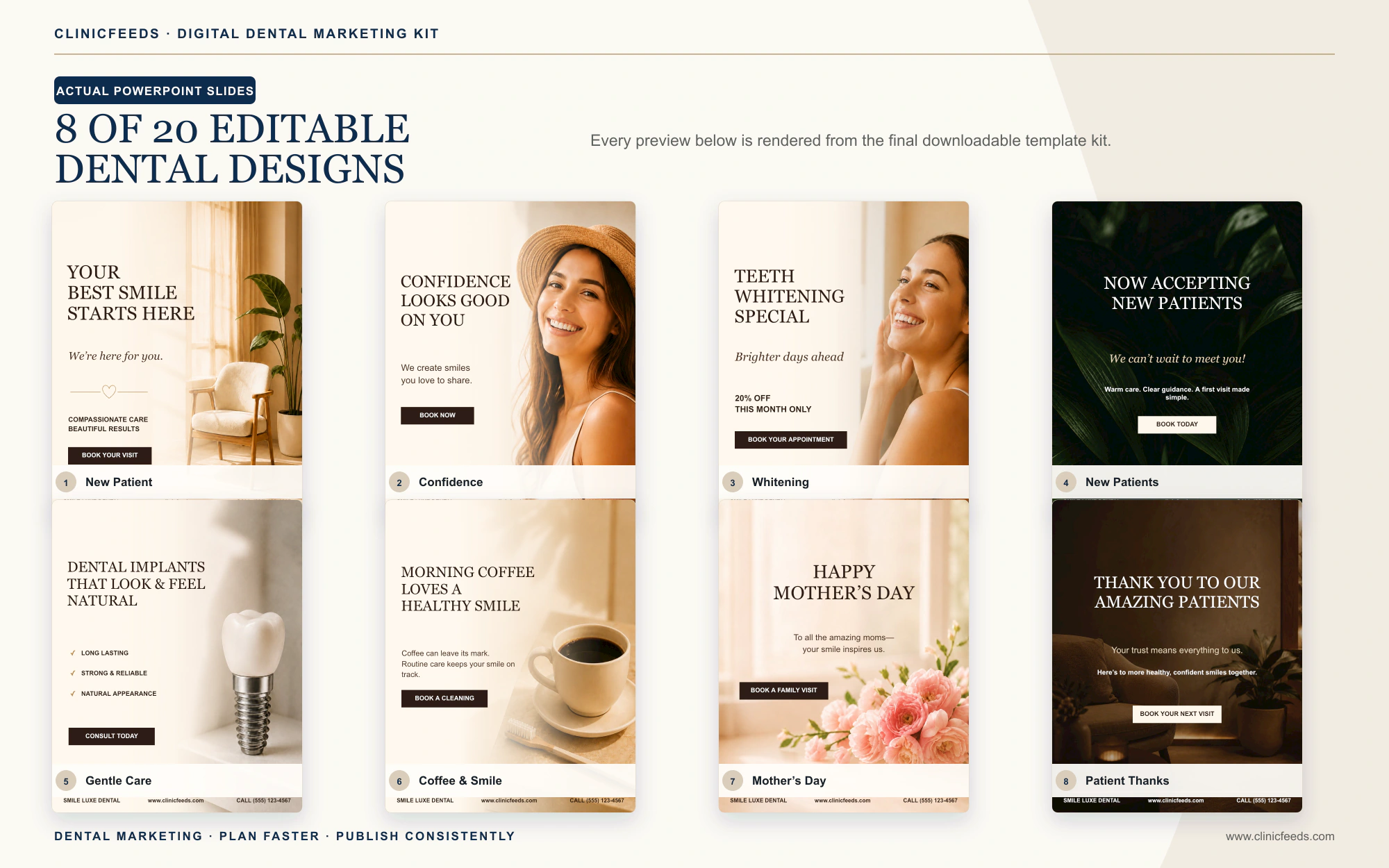
Start with a correctly sized source file: the Smile Luxe Dental Kit includes 20 editable 2:3 Pinterest Pin layouts at 1000 × 1500 px, plus matching 4:5 Feed and 9:16 Story/Reels versions for coordinated campaigns. Inspect the Pinterest-ready kit files.
Why Pinterest Needs Its Own Dental Content Plan
Pinterest describes itself as a visual discovery engine. People search, open Pins, save useful ideas to boards and follow links to learn more. Pinterest also notes that a Pin may gain engagement hours, days, months or even years after publication.
That makes Pinterest better suited to durable, saveable resources than urgent office announcements. A holiday closure belongs on Google Business Profile and Facebook first. A “First Dental Visit Checklist” or “Questions To Ask At A Whitening Consultation” can remain useful for much longer and has a clearer reason to be saved.
A dental practice does not need to publish every type of content on Pinterest. Start with topics for which the practice has a useful website page, a qualified reviewer and an image or illustration it can legally publish.
30 Dental Pinterest Post Ideas
Oral Health Guide Pins
- Two-minute brushing routine. Create a simple sequence based on guidance reviewed by the dental team. Keep it general rather than individualized. Pin title: “A Simple Two-Minute Brushing Routine.” Destination: preventive care or patient education page.
- Children’s brushing chart. Offer a printable or saveable morning-and-evening tracker for parents. Avoid suggesting that the chart replaces professional advice. Visual: seven-day checklist. Destination: family dentistry resource.
- Floss and interdental tool guide. Compare the general purpose of floss, interdental brushes and water flossers while noting that individual recommendations vary. Visual: labeled comparison. Destination: home-care guide.
- Tooth sensitivity observation list. Suggest noting timing, triggers and duration before contacting the dental office. Do not use the Pin to diagnose the cause. Visual: three-column notes template. Destination: sensitivity information page.
- Travel dental care checklist. List practical items to pack and remind readers to discuss unresolved concerns before travel. Visual: suitcase checklist. Destination: travel or preventive care article.
- When a toothbrush may need replacing. Refer to visible wear and manufacturer guidance rather than presenting a rule that applies to every product and patient. Visual: new versus worn bristles. Destination: home-care resource.
Consultation And Treatment-Planning Pins
- Questions to ask at a teeth whitening consultation. Cover suitability, available approaches, expected timing, sensitivity and maintenance without promising an outcome. Visual: five-question list. Destination: whitening service page.
- Clear aligner consultation checklist. Suggest asking about assessment, records, alternatives, follow-up and retention. Do not imply that every reader is a candidate. Visual: consultation notes page. Destination: aligner overview.
- Dental implant planning questions. Focus on assessment, treatment stages, maintenance and patient-specific considerations. Visual: planning roadmap. Destination: implant information page.
- Veneer consultation questions. Include goals, alternatives, tooth preparation, maintenance and the limits of digital previews. Visual: question card. Destination: cosmetic dentistry page.
- What happens before a dental crown? Explain the high-level evaluation and planning process used by the practice, without prescribing treatment. Visual: process overview. Destination: restorative dentistry page.
- Preparing questions when dental visits feel stressful. Offer a notes template for concerns, past experiences and communication preferences. Visual: appointment conversation planner. Destination: patient comfort or first-visit page.
First-Visit And Patient-Preparation Pins
- First dental visit checklist. List only the identification, forms, medication information or insurance details the practice actually requests. Visual: printable checklist. Destination: new patient page.
- Your first visit in three steps. Show request, confirmation and visit without implying that an online request is an immediate booking. Visual: three-step timeline. Destination: appointment information.
- Questions to ask a new dentist. Include communication, services, emergency contact, financial policies and follow-up. Visual: saveable question list. Destination: practice approach page.
- How to prepare a medication list. Explain what the practice asks patients to bring and direct personal questions to the clinical team. Visual: blank preparation worksheet. Destination: patient forms page.
- Insurance and payment questions to check. Encourage readers to verify plan-specific coverage, limitations and payment policies. Visual: neutral financial checklist. Destination: financial information page.
- Accessibility planning before an appointment. List the practice’s verified contact route and accommodations, then invite readers to discuss individual needs privately. Visual: appointment access checklist. Destination: accessibility or contact page.
Family And Seasonal Planning Pins
- Back-to-school dental checklist. Combine scheduling, updated health information and home-care supplies without implying appointment availability. Visual: school calendar design. Destination: family dentistry page.
- Sports mouthguard planning guide. Explain the assessment or fitting service the practice actually provides. Visual: preseason checklist. Destination: mouthguard service page.
- Holiday oral health routine. Share realistic habits without using guilt-based food messaging. Visual: holiday routine card. Destination: preventive care article.
- Wedding or event smile planning timeline. Encourage early consultation and explain that suitability, timing and results vary. Visual: month-by-month planning template. Destination: cosmetic consultation page.
- Year-end dental benefits questions. Tell readers to confirm their own eligibility, coverage and deadlines and to contact the office early. Visual: benefits review checklist. Destination: financial information page.
- Family travel dental kit. Create separate reminders for adults and children using product-neutral language. Visual: two-column packing list. Destination: family dental resource.
Practice Trust And Evergreen Resource Pins
- How the practice explains treatment options. Describe assessment, questions, alternatives and informed decision-making. Visual: consultation pathway. Destination: practice philosophy page.
- Meet the dental team by role. Explain how the dentist, hygienist, assistant and coordinator support the patient journey. Use approved images and accurate credentials. Visual: role guide. Destination: team page.
- Dental terms in plain language. Define five frequently used terms without turning the Pin into a diagnosis tool. Visual: mini glossary. Destination: related education article.
- Myth versus fact resource. Choose one claim the clinical team can support and explain the answer on the destination page. Visual: myth/fact Pin. Destination: evidence-reviewed article.
- Thirty-day oral health habit tracker. Offer a neutral tracking sheet for a routine already reviewed by the practice. Visual: printable calendar. Destination: downloadable resource page.
- Patient education library index. Create one Pin that leads to a curated page of first-visit, preventive and service-planning resources. Visual: “Start Here” guide. Destination: clinic education hub.
Five Ready-To-Adapt Pinterest Pin Examples
First-Visit Checklist Pin
Pin title: First Dental Visit Checklist: What To Bring
Use this practical checklist to prepare for a first appointment at [Practice Name]. Review the forms, information and arrival details our team currently requests. Requirements vary by practice and appointment type. See the complete first-visit guide: [link].
Alt text: Vertical first dental visit checklist showing identification, forms, medication information and arrival reminders.
Whitening Consultation Pin
Pin title: 5 Questions To Ask About Professional Teeth Whitening
Planning a whitening consultation? Ask about suitability, available approaches, timing, sensitivity and maintenance. Treatment recommendations and results vary. Review how whitening consultations work at [Practice Name]: [link].
Alt text: Five-question checklist for preparing for a professional teeth whitening consultation.
Children’s Routine Pin
Pin title: A 7-Day Brushing Chart For Families
Save or print this morning-and-evening routine chart for your family. It is a planning tool, not individualized dental advice. For age-appropriate guidance, speak with your dental team and read our family oral health resource: [link].
Alt text: Seven-day children’s brushing chart with morning and evening check boxes.
Clear Aligner Planning Pin
Pin title: Clear Aligner Consultation Questions To Save
Bring these questions to an aligner consultation: assessment, alternatives, expected follow-up, retention and patient-specific considerations. Not everyone is a candidate. Learn about the assessment process at [Practice Name]: [link].
Alt text: Vertical checklist of questions to ask during a clear aligner consultation.
Dental Anxiety Conversation Planner
Pin title: Plan What To Tell Your Dental Team Before A Visit
Use this notes page to record questions, communication preferences and concerns you want to discuss privately with the dental team. Do not post personal health information in Pinterest comments. Review [Practice Name]’s first-visit information: [link].
Alt text: Appointment conversation planner with sections for questions, preferences and private concerns.
A Four-Week Dental Pinterest Posting Plan
Start with three original Pins per week. This is a manageable test for a small practice and creates enough variety to compare topics without filling the account with near-duplicate designs.
| Week | Pin 1 | Pin 2 | Pin 3 |
|---|---|---|---|
| Week 1 | First-visit checklist | Home-care visual guide | Service consultation questions |
| Week 2 | Family planning resource | Plain-language dental glossary | Patient comfort planner |
| Week 3 | Seasonal checklist | Treatment process overview | Myth versus fact resource |
| Week 4 | Appointment preparation | Practice approach guide | Thirty-day habit tracker |
Do not publish three different color variations that lead to the same thin page. Each Pin should have a distinct search intent or a meaningfully different resource. Review results over several weeks before increasing frequency.
How To Use The ClinicFeeds 2:3 Pinterest Templates
Pinterest recommends a 2:3 aspect ratio, commonly 1000 × 1500 pixels, for standard image Pins. ClinicFeeds dental kits include a dedicated 2:3 PowerPoint file at that size, so the Pinterest version should be created from that source—not by stretching another platform’s export.
- Open the 2:3 Pinterest PowerPoint file.
- Choose one searchable topic, such as “First Dental Visit Checklist,” rather than a vague slogan.
- Replace the sample image, clinic name, headline and supporting copy.
- Keep the headline concise and readable on a phone. Do not place essential disclosures at the very bottom where interface elements may compete for space.
- Export the slide as a 1000 × 1500 PNG or JPG and confirm that it is sharp.
- Add a Pin title, description, destination link, relevant board and meaningful alt text inside Pinterest.
- Open the destination page on mobile and confirm that it directly answers the Pin’s promise.
Use the matching 4:5 file for Instagram and Facebook feeds and the 9:16 file for Stories or Reels. The campaign theme can remain consistent while each platform receives the correct layout.
Pinterest Title, Description And Link Checklist
- Title: State the resource or question clearly. Pinterest allows up to 100 characters, though less may display in feeds, so put the useful phrase first.
- Description: Explain who the resource is for, what it covers and what the reader will find after clicking. Pinterest says descriptions help determine relevance even when they are not visible in every feed view.
- Destination link: Link to the most relevant article, service explanation or patient resource. Pinterest says a clear match between the Pin and landing page can affect how prominently the Visit site option appears.
- Alt text: Describe what a person can see in the Pin. Pinterest supports alt text of up to 500 characters for standard and video Pins; do not use it as a hidden keyword list.
- Board: Save the Pin to a board with a focused name and description, such as “Dental Visit Planning” or “Family Oral Health Guides.”
- Review: Check the image, title, description, board and link before publishing. Pinterest notes that the media itself cannot be replaced after publication.
Five Useful Pinterest Boards For A Dental Practice
- Dental Visit Planning: first visits, appointment preparation, accessibility and financial questions.
- Family Oral Health Guides: children’s routines, school planning, travel and sports resources.
- Cosmetic Dentistry Questions: consultation planning for whitening, veneers and aligners without guaranteed-result language.
- Everyday Dental Care: brushing, interdental tools, sensitivity notes and preventive routines.
- [Practice Name] Patient Resources: accurate clinic-specific guides that link to the practice website.
Do not create a board for a service the practice does not provide. Review board titles and descriptions when services, clinicians or website destinations change.
What To Measure In Pinterest Analytics
A Pinterest business account provides Analytics for organic and paid content. Available metrics include impressions, saves, Pin clicks and outbound clicks. Match the metric to the Pin’s purpose:
- Impressions: whether the Pin appeared on screen.
- Saves: whether people considered the resource useful enough to keep on a board.
- Pin clicks: whether people opened the Pin for a closer look.
- Outbound clicks: whether people followed the destination link away from Pinterest.
- Qualified actions: downloads, contact requests or appointment inquiries that can be attributed with appropriate analytics.
Claiming the practice website can connect the profile to Pins saved from that domain and provide additional insight. Measure topics and destinations over time; an impression or save is not the same as a booked appointment.
Pinterest, Instagram And Google Posts Are Different
| Platform | Best Use | ClinicFeeds Starting Size |
|---|---|---|
| Searchable, saveable guides and planning resources | 2:3 Pinterest Pin | |
| Visual feed content, Stories and Reels | 4:5 feed or 9:16 Story/Reel | |
| Google Business Profile | Current services, local patient information, offers and office updates | Adapt the 4:5 source and preview cropping |
| Community updates, links, explanations and local conversations | Adapt the 4:5 feed source |
Use the dental Google Business Profile post ideas for owner updates on Search and Maps, and the dental Facebook post ideas for community-oriented posts. Pinterest content should remain more evergreen and resource-led.
US And Canada Publishing Review
This is practical marketing guidance, not legal advice. Pinterest’s Community Guidelines restrict harmful health misinformation, including medically unsupported claims that create public health or safety risks. Paid campaigns also have separate healthcare advertising rules and country-specific restrictions, so an organic Pin should not be assumed to be eligible for promotion.
In the United States, the American Dental Association warns that patient images or details may violate privacy requirements when they identify a patient or reveal that someone is a patient without appropriate authorization. The Federal Trade Commission requires health-related advertising claims to be truthful, non-misleading and adequately supported.
In Canada, requirements vary by province. The Royal College of Dental Surgeons of Ontario emphasizes that dentists remain responsible for advertising published by the practice, staff or third parties and that consent must match the context in which patient information or images are used.
- Have clinical education reviewed by a qualified member of the practice.
- Do not diagnose a Pinner or invite personal health information in comments.
- Use patient images, testimonials and treatment details only with the required authorization for Pinterest and the intended purpose.
- Do not publish fabricated, materially altered or misleading before-and-after images.
- Avoid guaranteed outcomes, unsupported superiority claims and inaccurate professional titles.
- Confirm that the landing page contains the same service, offer or resource described by the Pin.
- Check separate Pinterest advertising rules before paying to promote healthcare content.
Create Pinterest Content With ClinicFeeds
The Smile Luxe Dental Social Media Template Kit includes 20 editable 2:3 Pinterest Pin pages, 20 matching 4:5 feed pages and 20 matching 9:16 Story/Reels pages. It also includes an Excel content planner, captions, hashtags, AI image prompts and PDF guides.
For a first-visit campaign, the New Patient Welcome Campaign Kit provides matching 2:3 Pinterest layouts for topics such as what to expect, what to bring, team introductions and booking preparation.
Explore the Dental Social Media Content System, build a repeatable workflow with the dental social media content calendar, or review the guide to dental patient education post ideas.
Frequently Asked Questions
What Should A Dentist Post On Pinterest?
A dentist can publish visual patient resources such as first-visit checklists, oral health routines, consultation questions, family planning guides, seasonal reminders and links to evidence-reviewed educational pages.
What Size Should A Dental Pinterest Pin Be?
Pinterest recommends a 2:3 aspect ratio, commonly 1000 × 1500 pixels, for standard image Pins. ClinicFeeds dental kits include a dedicated PowerPoint file at this size.
How Often Should A Dental Practice Post On Pinterest?
Start with a sustainable test, such as one to three approved core themes per week adapted into original Pins. Review saves, Pin clicks, outbound clicks, and the quality of website actions before increasing output. The capacity-based posting guide for dental practices helps separate core themes from platform exports.
Can A Dental Practice Reuse Instagram Posts On Pinterest?
The campaign idea can be reused, but the visual should be rebuilt in 2:3 format with a searchable title, useful description and matching destination page. Do not stretch the 4:5 Instagram export.
Should A Pinterest Pin Link To The Homepage?
Usually not. Link to the page that directly continues the Pin’s topic, such as a first-visit guide, patient education article or specific service overview.
Can A Dental Practice Use Before-And-After Images On Pinterest?
Only after confirming the required patient authorization, accuracy, image handling, professional advertising rules and Pinterest policies. Do not imply that another patient will receive the same result.
Does A Dental Practice Need A Pinterest Business Account?
A business account provides access to Analytics and additional publishing tools. Claiming the practice website can also connect the profile with Pins saved from that domain and improve reporting visibility.
Sources And Review Notes
- Pinterest Business: Pin And Ad Specifications
- Pinterest Business: Pin Performance And Distribution
- Pinterest Business: Pinterest Analytics
- Pinterest: Guide To Creating Pins
- Pinterest Business: Add Alternative Text To Pins
- Pinterest Business: Claim Your Website
- Pinterest: Community Guidelines
- Pinterest: Advertising Guidelines
- American Dental Association: Marketing And Advertising
- Federal Trade Commission: Advertising And Marketing
- RCDSO: Use Of Social Media
Last reviewed: July 24, 2026.