
At 11:40 a.m., the assistant is turning over an operatory, the front desk is answering two calls, and the practice manager is trying to close an insurance question. That is not a realistic moment to ask the team to record a Reel.
Many dental practices do not have a shortage of useful things to say. They have a shortage of uninterrupted production time—and not every employee wants their face, voice or personal identity used in marketing.
Quick Answer
A dental practice can maintain a useful social presence without filming staff or patients every week. Build posts around approved patient questions, appointment preparation, service education, reminders and clinic updates. Prepare several posts at once, assign one clinical reviewer, and export each approved topic into the formats the practice actually uses.
Video can be valuable, but it is not a prerequisite for a clear, active and trustworthy dental page.
Treat social media as a workflow, not an extra chairside task
In a recent public discussion, a dental assistant described social media filming taking over the few minutes available between patients. Other assistants said they were camera-shy or did not consider on-camera marketing part of their role. That does not mean the practice should stop communicating. It means the content process needs a defined owner, protected time and an alternative for people who do not want to appear.
The simplest division of work is:
| Role | Responsibility |
|---|---|
| Content coordinator | Select topics, prepare the first draft and update clinic details |
| Clinical reviewer | Check clinical wording, claims and treatment context |
| Practice manager or owner | Approve offers, dates, links and final publishing |
One person may hold two roles in a small practice. The important point is that the job is named, scheduled and reviewed instead of being handed to whoever has a quiet minute.
What can a dental practice post without filming anyone?
Start with content that helps a patient understand the practice.
Patient education
Turn common, general questions into short explanations:
- Why does a hygienist measure the gums?
- What should a new patient bring to the first visit?
- What is the difference between plaque and tartar?
- When should a patient call the office about a dental concern?
Keep the wording general and ask a dentist or appropriate clinical team member to review it. A social post should educate, not diagnose an individual reader.
Appointment preparation
Create posts that reduce uncertainty:
- What happens after a patient requests an appointment?
- How early should someone arrive?
- Which forms may be completed in advance?
- Who should a patient contact about accessibility, insurance or payment questions?
These posts are useful because they answer operational questions the front desk already handles.
Service awareness
Explain what a consultation or appointment is for without promising a result. For example:
Considering professional whitening? A consultation gives you a chance to discuss available options, timing and whether treatment may be suitable for you.
That is more responsible than a universal promise about shade improvement or comfort.
Reminders and clinic updates
Static graphics work well for:
- Holiday hours
- New-patient availability
- Seasonal scheduling reminders
- Benefit-year reminders, where appropriate
- Community participation
- A change in the clinic's contact or booking process
Verify every date, eligibility statement and offer before publishing.
Trust content without patient photos
A practice can explain its values, introduce a care process, show a privacy-safe detail of the office, or share a de-identified review excerpt when the practice has confirmed that the use is permitted. Never assume that a public review or an image already in the patient record can be reused in marketing without checking the applicable rules and permission.
A realistic weekly production routine
The following routine can be completed as one scheduled block rather than in fragments between patients.
1. Collect four real questions
Ask the front desk and hygiene team which questions came up repeatedly this week. Do not ask them to write the posts. Their job is to identify the friction.
2. Give each question one purpose
Label it:
- Educate: help someone understand a general dental or appointment topic.
- Reassure: reduce uncertainty about the practice or first visit.
- Remind: prompt an existing patient to take an appropriate next step.
- Invite: direct an interested person to a consultation, information page or contact route.
3. Draft the copy before choosing the image
Write one patient-friendly headline, two or three supporting points and one next step. This prevents a stock image from deciding what the post is about.
4. Customize a prepared layout
Update the practice name, color, contact details, CTA and image. The ClinicFeeds PowerPoint customization guide explains how to replace those elements without rebuilding a post from scratch.
5. Export only the sizes you will use
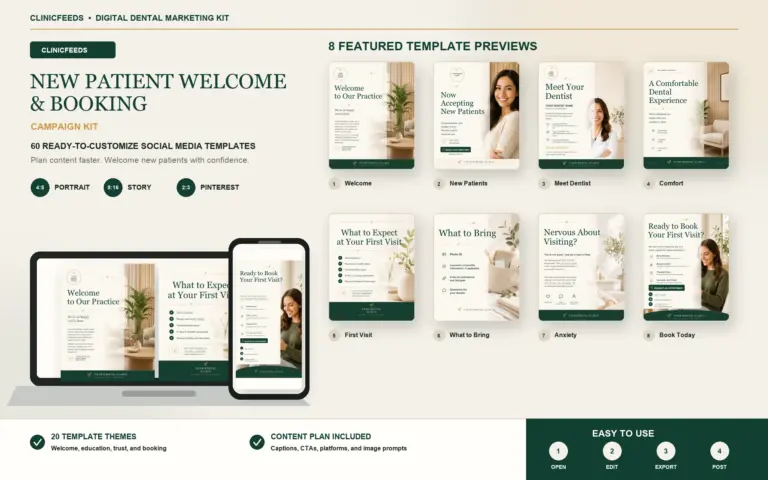
Use a 4:5 version for the Instagram or Facebook feed, a 9:16 version for Stories or Reels-style vertical placement, and a 2:3 version for Pinterest. The message may stay consistent, but the amount and placement of text should change for each canvas.
6. Complete one review
The reviewer should confirm:
- The clinical statement is accurate and appropriately limited.
- The post does not reveal patient or staff information without the required permission.
- The image is owned, properly licensed or appropriately authorized.
- The offer, date and availability are current.
- The CTA leads to the correct page, phone route or booking process.
7. Schedule and record the result
Add the publish date, destination URL and status to the content calendar. At the end of the month, note which topics generated saves, profile activity, website visits, calls or appointment requests.
Use one topic across formats—not one identical post everywhere
Suppose the approved topic is “What happens during a new-patient visit?”
- The feed post can summarize three parts of the visit.
- The Story can reveal one step per frame.
- The Pinterest Pin can use a search-friendly title such as “First Dental Visit Checklist for New Patients.”
- The Facebook caption can add local office context and link to the practice's first-visit page.
The clinic does not need four new ideas. It needs one accurate idea adapted to four reading situations.
What a template can and cannot solve
A template can save layout time, create visual consistency and give the team an organized place to start. It cannot verify clinical wording, provide patient authorization, confirm an offer or guarantee that a post will produce appointments.
Those controls remain with the practice. In the United States, the ADA advises obtaining written releases and training the team on privacy-safe social media use. HHS also distinguishes general consent from the detailed authorization required for certain uses and disclosures of protected health information. Canadian practices should check provincial requirements; Ontario's RCDSO, for example, emphasizes that consent must cover the actual scope and context of image use.
Start with a ready-to-edit monthly system
The Smile Luxe Dental Social Media Template Kit includes 60 editable PowerPoint pages across 20 dental themes, a 30-day Excel planner, captions, prompts and three platform sizes. Use it as the production starting point, then replace the sample details and imagery and complete the practice's own clinical, privacy and advertising review.
Frequently asked questions
Does a dental practice have to make Reels?
No. Reels can support reach and personality, but a practice can still publish useful education, reminders, FAQs, service information and clinic updates with static or lightly animated content.
Can a dental office use stock photos?
Yes, if the image is properly licensed and is not presented in a misleading way. Do not imply that a stock model is a patient, team member or treatment result from the practice.
How often should a busy dental practice post?
There is no universal posting target for every dental office. Choose one, two, or three approved core themes per week based on the team’s drafting and review capacity; exporting one theme into several platform sizes does not create several new topics. Use the capacity-based dental social media posting schedule to select a pace the practice can maintain.
Who should approve dental social media content?
Assign a named clinical reviewer for dental wording and a manager or owner for offers, dates, links, and final publishing. Use the dental social media approval checklist to record consent, image rights, claims, offer details, and final sign-off before scheduling.
Are dental social media templates HIPAA-compliant?
Templates themselves cannot make a practice HIPAA-compliant. Compliance depends on the information, images, permissions, systems and publishing process used by the practice.
Sources and review notes
- American Dental Association: Patient Privacy / Social Media
- HHS: Film, Media and Prior Written Authorization
- RCDSO: Professional Use of Social Media
- Reddit: Dental assistants discussing required social content
This article provides marketing workflow information, not legal or clinical advice. Practices should review federal, state, provincial and professional requirements that apply to them.
Last reviewed: July 27, 2026.