
Quick Answer
A 30-day dental implant social media content calendar should schedule the work around the posts, not just the posts themselves. The plan below uses nine primary publishing days, then adds clinical approval, Story and Pinterest reuse, landing-page checks, response time, UTM tracking and reporting. It creates a practical dental implant posting schedule and 30-day dental implant content plan without requiring the practice to publish 30 repetitive promotions.
This workflow is designed for dental practice owners, office managers, treatment coordinators and in-house marketers who need to coordinate production, clinical review, publishing, enquiries and reporting.
Review date: August 1, 2026. Recheck platform specifications, analytics setup, practice services and applicable advertising or privacy requirements before use.
This is an implant-specific operating calendar. For a broader month covering hygiene, new patients, reviews, services and seasonal topics, use the general 30-day dental social media content calendar. If your goal is a fixed patient journey from introductory education to a consultation request, use the 14-post dental implant consultation campaign.
This page owns the operating-calendar workflow: who completes each task, which asset must be ready, how links are tagged, when replies are checked and when results are reviewed. The 14-post campaign owns the patient-facing consultation sequence; the general dental calendar owns the broader monthly topic mix.
What the Month Produces
By Day 30, the practice should have completed a manageable set of outputs:
- nine primary Feed posts drawn from approved implant education and consultation topics;
- six scheduled Story adaptations, created from already approved messages;
- two scheduled Pinterest adaptations for topics with durable search value;
- one checked implant landing page and consultation route;
- a question log for the next month;
- a campaign-tagged report covering visits, enquiries and operational follow-up;
- a small library of approved content that can be updated and reused.
Those numbers are a practical starting point, not a platform rule. A practice that normally publishes twice a week can keep the same operational sequence and reduce the primary posts. Consistent review and follow-up are more valuable than filling every day with a graphic.
Calendar Fields to Set Up Before Day 1
Use an Excel workbook or another system the whole team can access. One row per content item is enough. Include these fields:
- Working title and patient question
- Content purpose: education, consultation familiarity, trust, administration or direct action
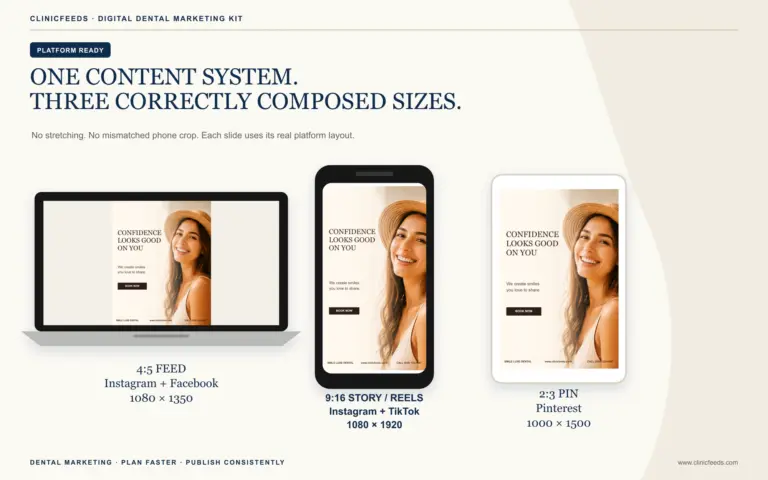
- Primary format: 4:5 Instagram/Facebook Feed, 9:16 Story/Reels or 2:3 Pinterest
- Source page and facts to verify
- Destination URL and CTA
- Caption and on-image copy
- Clinical reviewer and operational reviewer
- Image permission or license status
- UTM-tagged link
- Alt text
- Status: Draft, Clinical Review, Office Review, Approved, Scheduled, Published or Update Needed
- Publish URL, first-response check and seven-day result
- Review date or expiry trigger for fees, financing, availability and office procedures
A designed file is not automatically approved. Keep the status explicit so the scheduler cannot mistake “layout complete” for “ready to publish.”
Assign Owners Before the Calendar Starts
One person may cover several roles in a small practice, but every responsibility needs a name:
- Calendar owner: maintains dates, links, status and reporting.
- Content owner: adapts the approved message, caption and design.
- Clinical reviewer: approves candidacy, treatment, healing, risk, longevity and outcome wording.
- Operational reviewer: verifies consultation steps, availability, fee language, insurance process and contact routing.
- Publisher and monitor: completes the final privacy and link check, publishes, and monitors comments.
The American Dental Association recommends designated monitoring and final approval for practice social accounts. Make approval a workflow step rather than an informal assumption.
Choose One Objective the Office Can Support
A dental implant social media calendar works better when the monthly objective is narrower than “get more patients.” Choose the operational result the practice can support now:
- Improve implant education. Use this when the service page is accurate but prospective patients arrive with basic misunderstandings. Measure campaign-tagged implant-page visits, saves and the questions people bring to consultations.
- Make the consultation more familiar. Use this when people enquire but hesitate to schedule because they do not know what happens next. Measure visits to the consultation page, form starts and repeated administrative questions.
- Generate consultation requests. Use this only when the office has current availability, a clear response owner and a working request path. Measure completed requests, response time, consultations scheduled and attendance.
Write the objective at the top of the dental implant content calendar. It should guide topic selection and CTAs without turning every post into the same booking advertisement. If the office cannot respond promptly or the landing page is incomplete, choose education first and repair the conversion path during the month.
30-Day Dental Implant Social Media Content Calendar
Map Days 1–30 to the practice’s actual planning month. If a task falls outside staffed hours, move it to the nearest working day while preserving the dependencies: facts before design, approval before scheduling, and a working destination before the CTA goes live.
| Day | Action | Owner | Output or check |
|---|---|---|---|
| 1 | Choose one monthly objective: implant education, consultation familiarity or consultation requests. | Practice owner + calendar owner | One objective and one primary conversion |
| 2 | Audit the implant landing page, consultation form, phone route, mobile display and response ownership. | Calendar owner + office manager | Working destination with current information |
| 3 | Collect non-identifying questions from calls, consultation notes and the existing content log. | Front desk + treatment coordinator | Ten to fifteen usable questions with no PHI |
| 4 | Select eight to twelve relevant themes and assign education, planning, trust or action intent. | Calendar owner | Prioritized topic list; no need to use every available theme |
| 5 | Draft the first three posts: a basic implant explanation, an options overview and what happens at a consultation. | Content owner | Copy, CTA, destination and source notes |
| 6 | Review clinical language and implied claims before design. | Clinical reviewer | Approved facts and required qualifications |
| 7 | Create 4:5 assets for the first three posts and prepare one Story and one Pinterest adaptation. | Content owner | Export-ready files in the correct dimensions |
| 8 | Publish the basic “What is a dental implant?” education post. | Publisher | 4:5 Feed post, factual alt text and tagged landing-page link |
| 9 | Adapt Day 8 into a short Story; monitor replies and log new general questions. | Publisher + front desk | 9:16 Story and response log |
| 10 | Publish a balanced bridge, denture and implant options overview. | Publisher | Feed post linking to a complete comparison or consultation page |
| 11 | Turn the approved options topic into a 2:3 Pinterest resource; retest the destination on mobile. | Content owner | Pinterest Pin and verified link |
| 12 | Publish an approved options-recap Story, then review comments, saves, landing-page visits and questions; do not diagnose in comments or DMs. | Calendar owner + clinical escalation contact | 9:16 Story, response record and content gaps |
| 13 | Publish “What happens at an implant consultation?” using the practice’s real process. | Publisher | Feed post with consultation-page CTA |
| 14 | Draft and design the next three topics—candidacy boundaries, planning records and treatment stages—then obtain clinical and operational approval before scheduling. | Content owner + clinical reviewer + office manager | Three approved, export-ready assets with captions, destinations and required qualifications |
| 15 | Publish a candidacy education post that explains why an individual assessment is required. | Publisher | Feed post without online screening claims |
| 16 | Reuse the candidacy message as a Story Q&A and direct personal questions to the approved contact route. | Publisher | 9:16 Story with privacy-safe response language |
| 17 | Publish an education post about the role of records or imaging in treatment planning. | Publisher | Clinically approved Feed post using licensed or authorized imagery |
| 18 | Use questions from Days 12–17 to improve the landing-page FAQ, then reuse one approved answer as a Story; check the form and phone instructions again. | Calendar owner + office manager | Maintained web destination and one 9:16 FAQ Story |
| 19 | Publish a treatment-journey post that shows stages without promising a fixed timeline. | Publisher | Feed post linked to the treatment-journey section |
| 20 | Create a Pinterest “questions to ask about timing” checklist from approved material. | Content owner | 2:3 Pin with a durable resource-page link |
| 21 | Review the first two weeks of traffic and response time; pause weak destinations before adding more CTAs. | Calendar owner | Mid-month traffic and operations note |
| 22 | Draft and design three higher-intent posts—fees process, care and maintenance, and consultation questions—then obtain clinical and operational approval before scheduling. | Content owner + clinical reviewer + office manager | Three approved, export-ready posts with current operational facts, destinations and review dates |
| 23 | Publish how the practice handles estimates, insurance questions or payment information—without coverage or approval promises. | Office manager + publisher | Current administrative FAQ with review date |
| 24 | Publish a Story checklist of questions to bring to an implant consultation. | Publisher | 9:16 saveable checklist and link to full resource |
| 25 | Publish a care-and-maintenance education post with clinician-approved scope. | Publisher | Feed post that does not replace individual aftercare |
| 26 | Confirm consultation availability, contact ownership, page accuracy, UTM links and mobile form completion before the final CTA. | Office manager + calendar owner | Conversion-path preflight passed |
| 27 | Publish a direct but restrained consultation invitation. | Publisher | Feed post with one clear CTA and no outcome guarantee |
| 28 | Publish a final consultation-reminder Story, monitor comments, calls and form requests, and route clinical questions through the approved process. | Front desk + clinical escalation contact | 9:16 Story plus response-time and enquiry-quality record |
| 29 | Report available results by post and destination; schedule outstanding seven-day reviews for posts published on Days 23, 25 and 27; identify messages worth updating or repurposing. | Calendar owner | Available-results report, outstanding seven-day review dates and update list |
| 30 | Archive source files, record review dates, choose next month’s questions and assign the first approval meeting. | Calendar owner + reviewers | Reusable approved library and next-month starting list |
Choose Topics Without Turning the Month Into 30 Promotions
The calendar needs a varied mix even though the subject is dental implants. A workable balance is:
- Four education posts: definition, options, planning and treatment stages.
- Two consultation-familiarity posts: what happens and what to bring or ask.
- One maintenance post: ongoing care or follow-up.
- One administrative post: the practice’s current estimate, insurance-question or payment process.
- One direct action post: request an implant consultation.
Use the implant post ideas guide to select topics, then build safe, clinically reviewable briefs with the dental implant patient education posts workflow. The calendar coordinates production; those resources supply topic and brief depth.
Use One Approved Message Across Three Sizes
Do not stretch one image into every platform. Adapt the approved message to the publishing context:
- 4:5 Instagram/Facebook Feed: one question, one useful point and a caption with the next step.
- 9:16 Story/Reels: question, answer boundary and CTA across two or three readable frames.
- 2:3 Pinterest: a specific, searchable checklist or explainer title linked to an evergreen resource page.
Check the dental social media post sizes guide before export. If the team edits in Microsoft PowerPoint, follow the PowerPoint customization guide so text, images and export dimensions remain consistent. For finished copy structures, use the separate dental implant Instagram captions resource.
Build UTM Links the Team Can Read
Use a consistent naming convention. Google Analytics recommends using campaign parameters such as utm_source, utm_medium and utm_campaign to identify referring campaigns. Add utm_content to distinguish individual posts.
Example:
https://exampledentalpractice.com/implants/?utm_source=instagram&utm_medium=social&utm_campaign=implant_education_aug2026&utm_content=day13_consultation_expectations
Use lowercase values and one agreed spelling. instagram, Instagram and ig can fragment reporting. If the practice uses custom channel groups, follow its documented naming convention rather than assuming a non-standard medium will map automatically. Keep the destination and UTM link in the calendar, then test the final URL on a phone before scheduling.
Google’s official campaign URL guidance explains the available parameters and where custom-campaign traffic appears in Analytics.
Run a Ten-Minute Preflight Before Every Publish Day
The calendar owner can complete this check without reopening the whole strategy:
- Compare the scheduled file with the approved caption and confirm that the image has not reintroduced a broader claim.
- Check names, credentials, location, phone number, service availability, consultation instructions and any fee language.
- Confirm that a clinician approved treatment, candidacy, timing, healing or outcome wording.
- Confirm that every patient image, testimonial or radiograph has the required authorization, or replace it with a licensed, staged or non-identifying visual.
- Open the final UTM link on a phone, submit a test only when the office’s process permits it, and verify who receives the notification.
- Check the export size, readable text, factual alt text and safe space around Story interface elements.
- Assign the first comment and enquiry check so the published post is not left unattended.
Record the publisher’s initials and final check time. That small audit trail makes an implant dentistry content calendar easier to manage when several people prepare, approve and schedule the work.
Report Content, Conversion and Operations Separately
A post can attract saves but send few campaign-tagged implant-page visits. A landing page can attract visits but lose people at the form. A completed request can still go unanswered. Review all three layers:
- Content: relevant reach, saves, shares, Story completion and outbound clicks.
- Conversion: landing-page visits, form starts, completed requests, attributed calls, scheduled consultations and attended consultations.
- Operations: response time, unreachable requests, repeated questions and posts delayed by missing approval.
Do not copy patient health details into a marketing report. Use source labels and aggregate counts. A practical note might read: “Instagram organic, implant calendar, three consultation requests, median first response 22 minutes.”
The month-end report closes the 30-day implant content plan. Keep approved evergreen explanations, retire posts tied to expired details, and carry unresolved questions into the next brief meeting instead of automatically repeating the best-liked graphic.
US and Canadian Review Boundaries
This is a marketing operations template, not legal or clinical advice. Rules vary by state, province, regulator and practice circumstances.
- Claims: the FTC Health Products Compliance Guidance says advertising must be truthful and not misleading, and objective health-related claims need appropriate substantiation. Review the net impression created by the headline, image, caption and testimonial together.
- Privacy and assets: the ADA’s Social Media Policies for Dentists advises against posting a patient’s name, photograph, radiograph, testimonial or other identifying information without the appropriate written consent, authorization, waiver and release. Maintain final approval and designated monitoring.
- Patient-specific communication: US practices subject to HIPAA should follow their documented privacy, authorization and secure-communication procedures and review the applicable HHS HIPAA Privacy Rule materials. As a conservative practice workflow, do not request histories, radiographs or symptoms in public comments or ordinary social DMs; move patient-specific communication into the practice’s approved secure process.
- Canadian provincial requirements: Ontario practices can review the RCDSO’s professional social-media guidance and advertising guidelines. Practices elsewhere should use their own provincial dental regulator and applicable privacy rules. The Office of the Privacy Commissioner of Canada maintains an overview of federal, provincial and sector-specific privacy laws.
- Fees, financing and availability: verify current terms and required disclosures on the day of approval. Do not imply insurance coverage, financing approval, candidacy, a painless procedure, a fixed timeline or a guaranteed outcome.
When a qualification is needed to prevent a claim from misleading, do not bury it in tiny text or rely on a profile-link disclaimer to correct a bold promise.
Use the Calendar With an Editable Implant Campaign Kit
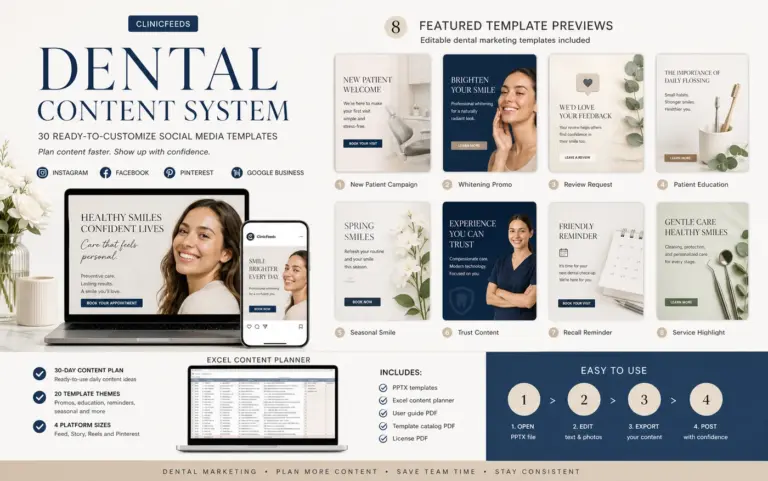
The Dental Implant Consultation Social Media Campaign Kit includes 60 editable PowerPoint pages across 20 implant consultation themes: 20 layouts in 4:5 Feed format, 20 in 9:16 Story/Reels format and 20 in 2:3 Pinterest format. The ZIP also includes an Excel content plan with captions, calls to action and image prompts, plus a User Guide and License PDF.
The 30-day operating calendar above is not a one-to-one copy of those 20 product themes. Select the themes that fit the practice’s objective, services and approved landing pages. Use the editable files to reduce production time, then complete the practice’s clinical, operational, privacy and compliance review before publishing.
One purchase licenses the files to one dental clinic. An agency may edit the files for one client clinic only when that clinic has its own license; editable source files may not be shared, redistributed or resold.
View the Dental Implant Consultation Social Media Campaign Kit
Frequently Asked Questions
Does a 30-day implant content calendar require 30 posts?
No. This calendar uses nine primary Feed posts plus selected Story and Pinterest adaptations. The remaining days cover preparation, approval, landing-page maintenance, response, reporting and reuse. Publishing less with a complete workflow is more sustainable than posting a promotion every day.
How is this different from the 14-post implant consultation campaign?
The 14-post campaign is a patient-facing sequence from education to consultation action. This 30-day calendar is an internal operating schedule. It includes non-publishing work, multiple formats, review meetings, link checks, UTM tracking, response and reporting.
Who should approve dental implant posts?
A clinical reviewer should approve candidacy, treatment, healing, risk and outcome language. An office manager or treatment coordinator should separately verify consultation steps, fees, availability and contact routing. A designated publisher should complete the final privacy, asset and link check.
Can the same implant post be used on Instagram and Pinterest?
The approved core message can be reused, but the format and destination should fit the platform. A 4:5 Feed post can introduce one point, a 9:16 Story can break it into frames, and a 2:3 Pinterest Pin should use a searchable headline linked to a durable web resource.
Which implant content should receive UTM links?
Tag links that send people to the implant service page, consultation page, fees information, checklist or request form. Use consistent source, medium and campaign values, plus a content value that identifies the post. Test the full URL before publication.
When should the calendar be reviewed?
Review progress weekly and complete a month-end report on Day 29 or 30. Late-month posts still require their scheduled seven-day review after Day 30. Recheck posts about fees, financing, insurance process, consultation availability and office procedures whenever those details change. Also revisit platform dimensions, analytics configuration and applicable advertising or privacy requirements periodically.
What is the difference between a content calendar and a posting schedule?
A posting schedule records when approved content will be published. A working content calendar also assigns the topic, format, owner, reviewer, destination URL, CTA, reuse plan, response task and result. A small dental practice can manage both functions in one shared workbook.
Sources and Review Notes
- Federal Trade Commission: Health Products Compliance Guidance
- American Dental Association: Social Media Policies for Dentists
- US Department of Health and Human Services: HIPAA Privacy Rule
- Royal College of Dental Surgeons of Ontario: Use of Social Media
- Royal College of Dental Surgeons of Ontario: Advertising Guidelines
- Office of the Privacy Commissioner of Canada: Privacy Laws in Canada
- Google Analytics: URL Builders and Campaign Parameters
Last reviewed: August 1, 2026. Platform features, analytics behavior and professional requirements can change. Confirm current specifications and local obligations before adapting the calendar.