Quick Answer
Useful dental Instagram post ideas for new patients answer the questions people have before they contact a practice: Who do you help? What will a first visit involve? Who will I meet? What should I bring? How do I request an appointment?
The strongest new-patient post is often not an offer. It is the answer to a sentence the coordinator hears before lunch. Build the feed around those real questions, then make the next step accurate and easy to find.
Plan The Feed Around The Patient’s Decision, Not Your Services Menu
A prospective patient rarely moves directly from a whitening image to a confirmed appointment. They usually pass through several smaller decisions: noticing the practice, checking whether it feels relevant, reducing uncertainty, understanding an option and deciding whether to make contact.
Connect that journey to the practice’s wider priorities with the dental office marketing ideas framework. It helps the team decide whether Instagram should reduce first-visit uncertainty, support local trust, explain services or strengthen appointment follow-through.
That journey gives a small clinic a practical editorial structure:
- Discovery: help the right local person recognize the practice.
- First-visit clarity: answer operational questions before they become friction.
- Trust: show who does the work and how the team communicates.
- Service understanding: explain what a consultation or service discussion may cover.
- Contact: show the exact next step and what happens after someone takes it.
Before publishing, confirm that the practice is currently accepting new-patient requests, that the named service is available at the stated location, and that the contact route works. A polished design cannot rescue outdated information.
Stage 1: Help The Right Patient Recognize The Practice
1. Welcome To The Practice, With A Specific Reason
Replace “Welcome to our page” with something that helps people self-select. Identify the location, practice type and a real point of relevance: family care, a calm first-visit process, extended hours or another verified feature.
New to [City]? [Practice Name] provides [accurate scope of care] from our [neighbourhood] office. Start with our first-visit guide to see how appointment requests work.
2. Who The Practice Is Designed To Help
Describe the actual patient groups the practice serves without implying that every person is suitable for every service. A family practice, a boutique cosmetic clinic and an office focused on adult restorative care should not publish the same introduction.
3. A Real View Of The Entrance And Reception Area
Show what someone will see on arrival. Add useful information: which entrance to use, where to check in or how to ask for accessibility support. Remove schedules, screens, paperwork and patient names from the frame before taking the photograph.
4. Meet The New-Patient Coordinator
Introduce the person who often creates the first human connection. Explain what they can help with—forms, scheduling questions, directions or financial information—using the role your practice actually assigns.
5. New To The Area? Start Here
This post can combine a local cue with a practical starting point. Mention the neighbourhood, parking or transit, current office hours and whether the clinic is accepting appointment requests. Avoid vague “best dentist near you” language.
Stage 2: Remove First-Visit Uncertainty
6. What Happens At A First Visit?
Explain the high-level sequence the office can verify. A conversation, review of relevant information, appropriate examination and time for questions may be accurate; a fixed list of procedures may not apply to every appointment.
7. What Should A New Patient Bring?
Create a clean checklist based on current office requirements. Depending on the practice, that might include identification, completed forms, medication information or insurance details. Do not copy another clinic’s checklist.
8. Your First Visit In Three Practical Steps
Use a short process post: request, confirmation and visit. The wording matters. If an online form only sends a request, do not label the final button “Book now” or suggest that the time is immediately confirmed.
9. How Forms And Personal Information Are Handled
Tell patients where to find approved forms and which secure route the practice uses for sensitive information. Do not ask people to post medical details in comments or direct them to an unmonitored social inbox.
10. Preparing When Dental Visits Feel Stressful
Offer a short conversation planner: previous concerns, communication preferences and questions to bring. Avoid promising a completely pain-free or anxiety-free visit. Instead, explain how patients can share needs privately before the appointment.
Stage 3: Build Trust With Specific People And Processes
11. Meet The Dentist Without The Superlatives
Use a current portrait and accurate credentials. Add one concrete detail about clinical interests or communication style, then link to the full team page. “Listens carefully and explains options” is useful only when the practice can support the claim; “the best dentist in [City]” is not.
12. Meet The Team By What They Do
Introduce a hygienist, assistant or coordinator through a real responsibility. This helps prospective patients understand the visit and avoids a row of interchangeable biographies.
13. How The Practice Explains Treatment Options
Show the consultation space and describe the process: assessment, questions, alternatives, likely next steps and patient-specific recommendations. This communicates more than a generic “we care” graphic.
14. A Morning Setup Detail
Photograph a non-patient part of the team’s preparation. Explain one verified routine in plain language. Do not claim that a tidy photograph proves a clinical outcome, and check the background for private information.
15. Technology With A Patient-Relevant Purpose
Choose one tool the practice actually uses and explain what it helps the team assess, record or discuss. Avoid calling equipment “state of the art” unless that description is accurate, supportable and useful to the reader.
Stage 4: Explain Services Without Turning The Feed Into A Price List
16. What A Preventive Visit May Cover
Give a high-level explanation and note that the visit depends on the patient’s needs and the clinician’s assessment. The post should help a new patient prepare, not diagnose or prescribe.
17. What A Whitening Consultation Discusses
Cover suitability, available approaches, timing, sensitivity and maintenance. Use a consultation image rather than an exaggerated result. State that recommendations and outcomes vary.
18. Clear Aligner Questions To Bring
Invite prospective patients to ask about assessment, alternatives, follow-up and retention. Do not imply that every viewer is a candidate or that treatment will produce a guaranteed appearance.
19. When To Contact The Practice About An Urgent Concern
Publish the exact route the clinic uses for urgent calls and clearly distinguish office information from emergency instructions. Verify hours and after-hours arrangements before every scheduled repost.
20. A Service FAQ Answered By The Right Clinician
Choose one question, not ten. Let the appropriate team member review the answer, write a clear text version for people watching without sound, and send readers to a detailed service page if they need more context.
Stage 5: Make Contact And Follow-Up Easier
21. How To Request A New-Patient Appointment
Show the real contact options and tell people what information the office needs. If the form does not confirm a time automatically, say that the team will follow up to review availability.
22. What Happens After The Form Is Submitted?
This is often missing from clinic marketing. Explain whether the team calls, emails or sends another form, when the patient should expect a response, and what to do if they do not hear back.
23. A Current Appointment Availability Update
Use carefully. State the location, appointment type and date the information was checked. Do not schedule evergreen “appointments available this week” graphics months in advance.
When availability is part of a time-bound campaign, use the dental office promotion planning guide to confirm capacity, terms, response ownership and the destination page before the post goes live.
24. One New-Patient FAQ From The Front Desk
Ask the team which operational question repeatedly delayed calls this week. Answer it publicly without discussing anyone’s personal circumstances. Questions about parking, forms, languages or insurance verification can be particularly useful.
25. Welcome After The Appointment Is Confirmed
Create a reassuring post or private follow-up asset explaining where to find directions, forms and contact information. Do not reveal or tag a patient unless the practice has the appropriate permission and a genuine reason to do so.
A Five-Post New-Patient Sequence For One Week
Do not publish all 25 ideas at once. Start with a short sequence that moves from recognition to preparation:
| Post | Patient Question | Useful Next Step |
|---|---|---|
| Monday | Is this practice relevant to me? | Review the location and practice introduction |
| Tuesday | Who will I speak with? | Meet the coordinator or team |
| Wednesday | What happens at a first visit? | Open the first-visit guide |
| Thursday | What should I prepare? | Save the verified checklist |
| Friday | How do I request an appointment? | Use the correct contact route |
This sequence can run as five individual 4:5 posts or as a smaller number of carousel posts. Instagram currently allows up to ten photos or videos in one feed carousel, and one orientation applies to the full carousel. Use only as many slides as the explanation needs.
Turn One Idea Into A Useful 4:5 Instagram Post
- Start with the patient question. Use the words a caller would use, not an internal service label.
- Confirm the answer. Check location, hours, services, forms, availability and contact wording with the responsible team member.
- Choose one visual. Use a real clinic image, an approved team portrait or an uncluttered editorial graphic.
- Write a descriptive first line. The reader should understand the topic before expanding the caption.
- Add one next step. Read, save, call or request—do not stack every CTA into one post.
- Review accessibility. Keep essential information in the caption and add meaningful alt text inside Instagram. Instagram allows the automatic alt text for a photo to be replaced with a custom description.
- Check the mobile result. Confirm crop, type size, location tags and the destination link before publishing.
Instagram Feed, Story And Carousel Have Different Jobs
| Format | Best New-Patient Use | ClinicFeeds Starting File |
|---|---|---|
| 4:5 Feed post | One durable question, introduction or checklist | 1080 × 1350 PowerPoint |
| 9:16 Story | Short sequence, current update or interactive question | 1080 × 1920 PowerPoint |
| 4:5 Carousel | A process or explanation that needs several connected pages | Duplicate and adapt related 4:5 layouts |
For Story sequences, use the separate guide to dental Instagram Story ideas. For caption structure, review the library of dental Instagram captions. The broader dentist Instagram content guide explains how new-patient posts fit alongside education, trust, reminders and service content.
What The Front Desk Should Verify Before Publishing
- Is the practice currently accepting new-patient appointment requests?
- Which location and clinician does the information apply to?
- Is the online form a request, a waitlist or a confirmed booking?
- Which forms and documents are genuinely required?
- Are hours, parking, transit and accessibility details current?
- Does the service page match the post?
- Who will monitor comments and messages?
Keep this review separate from the clinical review. The front desk owns current operational facts; the qualified clinical reviewer owns health information and treatment statements.
Measure Whether The Content Reduced Friction
Instagram Insights are available to business and creator accounts and may show views, accounts reached, interactions and accounts engaged for specific content. Meta notes that some metrics are estimated or still being introduced, so use the definitions displayed in the practice’s own dashboard.
New-patient content should also be measured outside Instagram:
- Did callers mention a post or arrive better prepared?
- Did fewer people ask the same basic operational question?
- Did the first-visit page receive relevant visits?
- Did the office receive complete appointment requests?
- Which topic produced qualified questions rather than only likes?
Record the post topic, format, CTA and front-desk outcome in the dental social media content calendar. A high reach number is useful context, not proof of a booked patient.
If the practice later promotes the post with paid distribution, evaluate it as a campaign with a landing page and conversion path. Use the dental advertising ideas guide before assigning budget.
US And Canada Publishing Review
This is practical marketing guidance, not legal advice. In the United States, the American Dental Association reminds practices that social media does not remove privacy, ethical or advertising obligations. The Federal Trade Commission requires advertising to be truthful and non-misleading.
Canadian requirements vary by province. The Royal College of Dental Surgeons of Ontario notes that consent for using an image in one context does not automatically authorize use on another platform or for another purpose.
- Do not identify or confirm a patient without appropriate authorization.
- Have clinical statements reviewed by a qualified member of the practice.
- Avoid guaranteed results, unsupported superiority claims and misleading before-and-after images.
- Use accurate professional titles, services, locations and offer conditions.
- Move personal health and appointment discussions to an approved private channel.
- Review state, provincial and professional advertising requirements before publishing.
Use These Ideas With The New Patient Welcome Campaign Kit
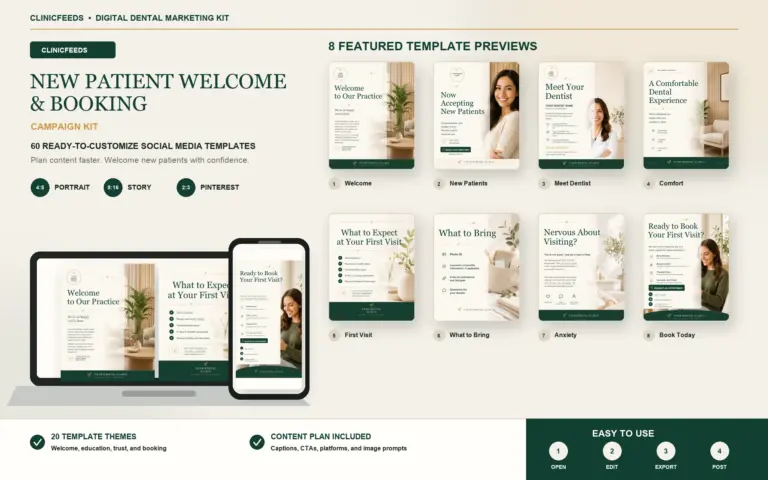
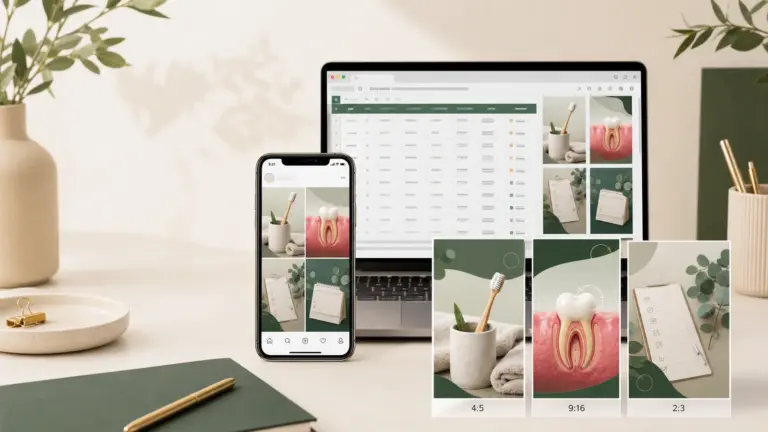
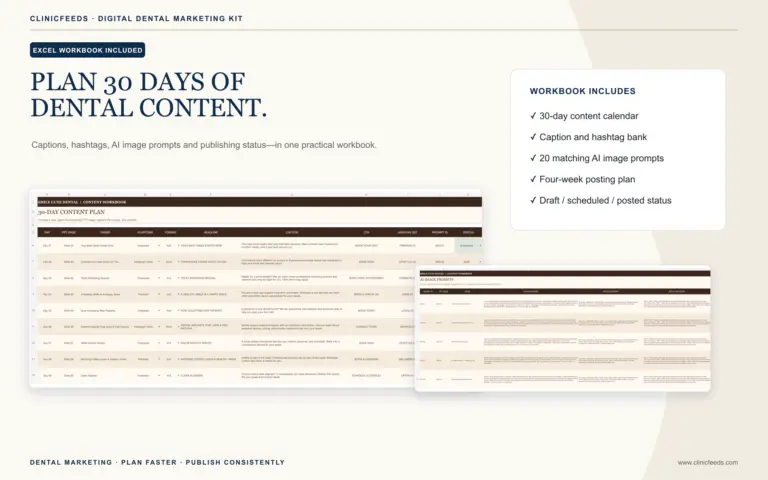
The New Patient Welcome Campaign Kit includes 60 editable PowerPoint pages: 20 Instagram Portrait designs in 4:5, 20 Story/Reels designs in 9:16 and 20 Pinterest designs in 2:3. It also includes an Excel content plan with captions, calls to action and image prompts, plus PDF guides.
Use the kit as a source system, not as finished clinic advertising. Replace demonstration images, clinic details, claims, contact information and offer terms before publishing. For broader educational topics, review the dental patient education post ideas and the Dental Social Media Content System.
Frequently Asked Questions
What Should A Dentist Post To Attract New Patients?
Post clear information about the practice, team, first-visit process, preparation, relevant services and appointment-request route. The goal is to reduce uncertainty, not to make every post promotional.
How Often Should A Dental Practice Publish New-Patient Posts?
Use a frequency the team can verify and maintain. A short weekly sequence or one new-patient post within a balanced schedule is more useful than repeating “Now accepting new patients” every day.
Can The Same New-Patient Post Be Used On Facebook?
The campaign topic can be reused, but the Facebook version may need more local context, a direct website link and a longer explanation. Review the information and crop separately for each platform.
Should Every Instagram Post Ask Patients To Book?
No. Some posts should invite people to read a first-visit guide, save a checklist or meet the team. Use a booking or contact CTA when it is the natural next step.
Can A Dental Practice Use Patient Photos?
Only after confirming the authorization, privacy, image-handling and professional advertising requirements that apply to the practice and the intended use. Permission for one context may not cover Instagram marketing.
Should A Clinic Use A Carousel For First-Visit Information?
Yes, when the topic needs a connected sequence. Keep the first slide specific, use one orientation throughout and avoid adding slides that do not help the patient understand or prepare.
What Image Size Should A Dental Instagram Feed Post Use?
ClinicFeeds provides 4:5 Instagram Portrait templates at 1080 × 1350 pixels. Review every export on a phone and confirm that text, faces and important details are not crowded by the interface or crop.
Sources And Review Notes
- Instagram Help Center: Share Multiple Photos Or Videos In A Carousel
- Instagram Help Center: Edit Alternative Text For A Post
- Instagram Help Center: About Instagram Insights
- Instagram Help Center: Action Buttons For Business Profiles
- American Dental Association: Marketing And Advertising
- American Dental Association: Social Media Policies For Dentists
- Federal Trade Commission: Advertising And Marketing
- RCDSO: Use Of Social Media
Last reviewed: July 24, 2026.